.svg)



On this page
Measure the work, not the signal.
See productive time and utilization by team, not just what looks active.


Key Takeaways
- Remote and hybrid teams need more than activity logs. The right software helps managers understand workload, capacity, and productivity so they can make better decisions.
- Monitoring tools now range from simple time trackers to comprehensive work data platforms that connect activity inputs with broader performance trends.
- Privacy matters as much as visibility. Transparent tracking and employee access to their own data can make adoption easier.
- The best tool depends on your goal, whether that's improving productivity, tracking billable hours, managing workloads, or reducing security risks.
- A good rollout starts with a clear purpose, the right level of monitoring, and a plan for turning data into action.
Remote work productivity: the challenge
Managing a remote or hybrid team can make everyday workforce problems harder to spot. One team may be overloaded while another has spare capacity. Project hours can creep up without anyone knowing where the time went.
Managers may also struggle to tell whether a productivity dip comes from workload, inefficient processes, or too many interruptions.
This is where remote desktop monitoring software can help.
The right tool gives managers precise data on time, activity, applications, projects, and productivity, so they can identify what’s slowing work down and decide what needs to change.
But the tools vary widely. Some are built mainly for time tracking and billing, while others offer deeper workforce analytics. The key is finding one that matches the problem your team actually needs to solve.
In this guide, we'll compare eight remote desktop monitoring software tools based on their features, pricing, strengths, and ideal use cases. We'll also cover what to look for before choosing a platform, and how to introduce monitoring without creating unnecessary friction for employees.
Why Remote Desktop Monitoring Software Matters in 2026
Remote and hybrid teams make traditional, in-person oversight difficult to scale. Managers can't simply walk over to someone's desk to understand whether a team is overloaded, underutilized, or spending too much time on administrative work.
Microsoft's 2025 Work Trend Index found that 80% of workers lack enough time or energy to get their work done, while 53% of leaders say productivity needs to increase.
Remote desktop monitoring software can provide some of that missing context. For example, managers can use time and activity data to identify where work is taking longer than expected. If one team consistently spends more time on administrative tasks than another, that can prompt a review of workflows, staffing, or resource allocation.
The same information can support accurate client billing for teams that charge by the hour and provide activity records for certain compliance and security processes.
The important part is what happens after the data is collected. Monitoring can be used primarily for oversight, or it can help managers understand how work gets done and where changes could improve productivity. This article focuses on the latter.
What Is Remote Desktop Monitoring Software?
Remote desktop monitoring software tracks activity on employees' computers while they work remotely or in hybrid environments.
Depending on the platform, this can include:
- Time tracking
- App and website usage
- Active and idle time
- Screenshots
- Project and task tracking
- Productivity reporting
- Workforce analytics
Some tools focus on straightforward time tracking, while others connect activity data with broader workforce and productivity insights.
What to Look for in Remote Desktop Monitoring Software
Not every monitoring platform solves the same problem. Before comparing tools, start by deciding what information your managers actually need.
Accuracy and Depth of Activity Data
Look for software that can answer more than "How many hours were logged?"
Consider whether it provides:
- Real-time activity information
- App and website usage data
- Active vs. idle time breakdowns
- Project and task context
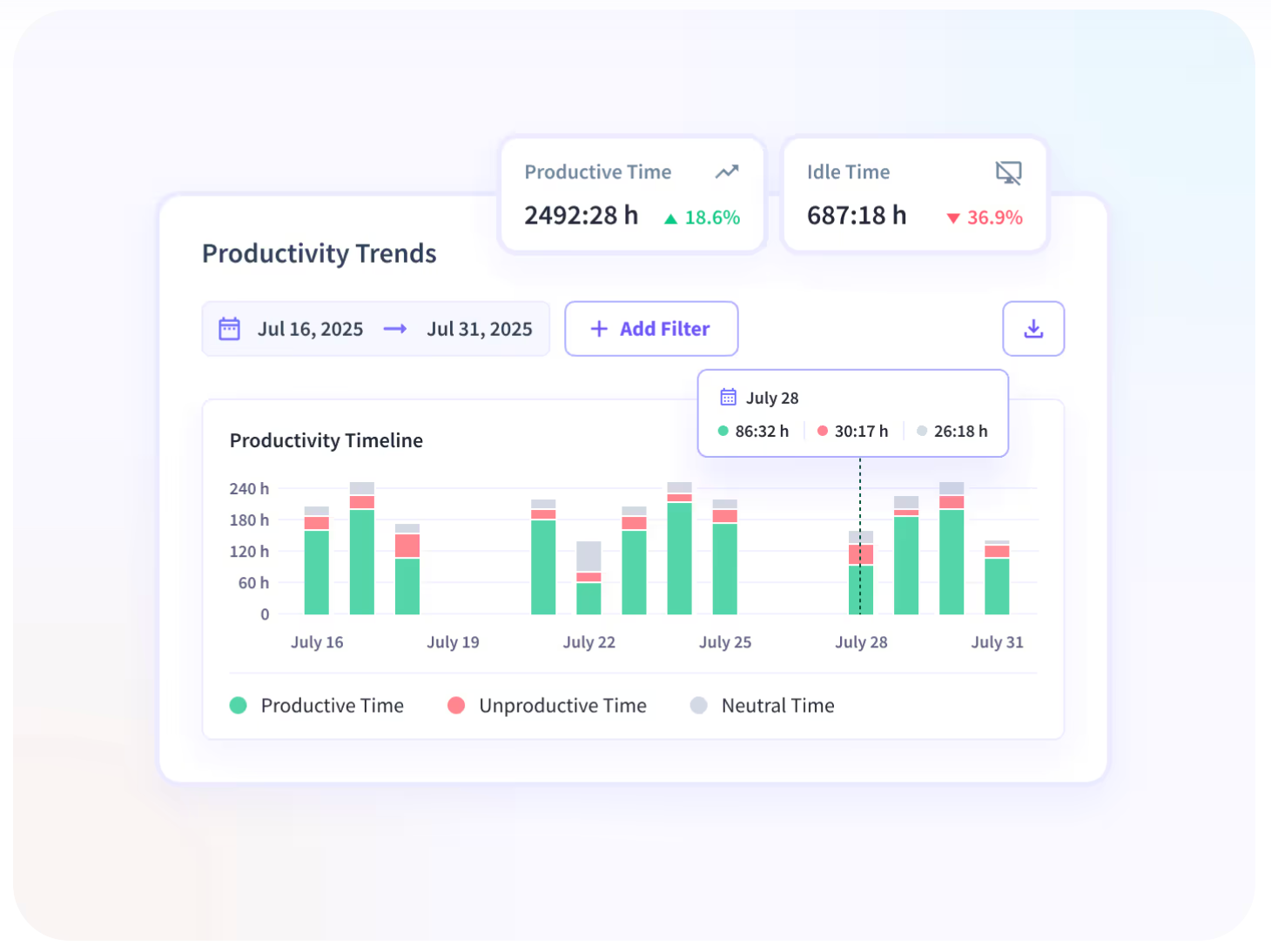
- Productivity trends over time
Privacy, Transparency, and Employee Trust
Monitoring works better when employees understand what is being collected and why.
Look for:
- Configurable monitoring rules
- Role-based permissions
- Privacy controls
- The option for employee to access to their own data
- Options to control screenshots or other sensitive information
Transparency can also make it easier to position monitoring as a productivity and workload tool rather than simply an oversight mechanism. The Best Way to Notify Employees About Monitoring Software covers this approach in more detail.
Ease of Deployment and Reporting
Remote teams often use different devices, operating systems, and working arrangements. A complicated rollout can quickly become an IT headache.
Before choosing a platform, check:
- How quickly it can be deployed
- Whether it supports your team’s devices
- How much configuration is required
- Whether managers can build useful reports without extensive training
- Whether it integrates with existing workplace tools
The 8 Best Remote Desktop Monitoring Software Tools
The best option depends on what you need the software to do. Some platforms are strongest at time tracking and billing, while others focus on workforce analytics, productivity, or security.
1. Insightful
Insightful is a work insights platform that brings workforce analytics and workflow optimization together in one platform. For remote and hybrid teams, its Workforce Analytics product combines time tracking and activity data with productivity and actionable insights, helping managers understand how work is distributed and where teams may have opportunities to improve efficiency.
Features
- Time Tracking & Auditing: automatic time tracking, with manual entries approved and recorded in an audit trail
- Productivity Trends and activity insights
- Project and task tracking
- App and Website Usage
- Screen Monitoring with configurable screenshots
- Location Insights, the Communication Report, and AI Adoption reporting, all included in the base Workforce Analytics plan
- Optional employee access to their own productivity data
- Insider Threat Detection and Audit Logs through Workspace Security, available within Workforce Analytics
Insightful is privacy-first; it doesn’t use keystroke logging or webcam and microphone capture. Screenshots are configurable and can be turned off.
Pricing
Workforce Analytics starts at $8 per seat per month when billed annually. Workflow Optimization is $12, while the Combo Plan is $16 per seat per month. Enterprise pricing is custom.
Best fit
Remote and hybrid teams of any size that want productivity and advanced reporting alongside transparent employee monitoring.
2. Hubstaff
Hubstaff combines time tracking with workforce management and is useful for agencies, contractors, and distributed teams. Tracked hours can connect with payroll, invoicing, projects, and workforce reporting.
Features
- Time tracking and automated timesheets
- App and URL tracking
- Activity levels
- Screenshots
- GPS tracking (paid add-on)
- Project and task tracking
Hubstaff's activity levels are based on keyboard and mouse interaction frequency rather than recording individual keystrokes. App and URL tracking is also available across its plans, with limits varying by plan.
Pricing
The Starter plan starts at $4.99 per seat per month when billed annually. Grow is $7.50, Team is $10, and Enterprise is custom.
Best fit
Agencies and teams that bill clients based on tracked hours or need time data connected to payroll and project management.
Quick takeaway: Platforms such as Hubstaff are particularly useful when recorded hours directly support billing, payroll, or project budgets. Work insights platforms like Insightful serve a broader operational purpose, connecting time data to workload, capacity, and how processes run.
3. ActivTrak
ActivTrak is a platform focused on productivity, workforce management, and analytics. Its emphasis is on understanding workforce trends alongside time tracking and employee monitoring features.
Features
- Automatic time tracking
- Activity summaries by user and team
- Productivity trends
- Workforce management
- Productivity benchmarking
- Reporting and dashboards
Its current plans are structured around Work Activity Tracking, Workforce Management, and Productivity Optimization, with capabilities expanding at each level.
Pricing
ActivTrak offers a free plan for up to three workers. Its paid plans range from $10 up to $21 per worker per month.
Best fit
Office-based teams on Windows, macOS, or ChromeOS that mainly need activity monitoring and productivity dashboards, and who are looking for cloud-only deployment.
4. Time Doctor
Time Doctor is a time tracking and workforce management platform for remote and distributed teams. It combines automatic tracking with productivity reporting and tools for managing schedules, attendance, and payroll.
Features
- Automatic time tracking
- Projects and tasks
- Screenshots
- Online and offline tracking
- Activity summaries
- Web and app usage reporting
- Productivity ratings
- Payroll tools
Time Doctor's Basic plan includes automatic tracking, projects and tasks, screenshots, and online or offline tracking. Standard adds features including web and app usage reporting, productivity ratings, attendance, and payroll.
Pricing
Annual pricing starts at $6.67 per user per month for Basic, $11.67 for Standard, and $16.70 for Premium. Enterprise pricing is custom.
Best fit
Remote and outsourced teams that need reliable time tracking with additional productivity and workforce management capabilities.
5. Teramind
Teramind is designed with insider threat detection and data loss prevention in mind. Its security-focused approach makes it relevant to organizations in highly regulated environments.
Features
- Data loss prevention
- Audio recording
- Keystroke logging
- User activity monitoring
- Email and instant message monitoring
Teramind offers different packages around monitoring, user activity management, DLP, and enterprise requirements.
Pricing
Teramind offers Starter, UAM, DLP, and Enterprise packages. Starter begins at $14 per seat per month when billed annually, with a five-seat minimum. UAM is $28, DLP is $32, and Enterprise pricing is custom.
Best fit
Security and compliance-focused industries with DLP needs.
6. DeskTime
DeskTime is an automatic time tracking platform aimed at teams that want a straightforward way to see how working hours are being used. It focuses on time tracking, productivity calculations, and project visibility.
Features
- Automatic time tracking
- Productivity calculations
- App and website tracking
- Document title tracking
- Project tracking
- Screenshots on higher Premium
DeskTime’s core Pro plan includes document title tracking, productivity calculations, and a web timer. Premium adds screenshots and product management tool integrations.
Pricing
Pro starts at $6.42 per user per month when billed annually, while Premium is $9.17. Enterprise pricing is custom.
Best fit
Small and mid-size teams looking for straightforward automatic time tracking and productivity monitoring.
7. Veriato
Veriato focuses on employee activity monitoring, insider risk management, and behavioral analytics. It’s may be of particular interest to organizations that prioritize investigating potential security or compliance risks.
Features
- Employee activity monitoring
- Behavioral analytics
- Insider risk scoring
- Productivity scoring
- Configurable reports and dashboards
- Alerts
- Sensitive data detection and redaction
Its UAM offering collects activity data across applications, websites, files, screenshots, network activity, and other sources. Its Insider Risk Management product adds capabilities such as user and group-level risk scoring.
Pricing
Veriato UAM starts at $18 per user per month when billed annually, with a five-user minimum. Its Insider Risk Management offering is quote-based.
Best fit
Organizations with insider risk, security, compliance, or employee investigation requirements.
8. Controlio
Controlio is an employee monitoring platform focused on computer activity, screen visibility, reporting, and alerts. It also offers cloud, on-premises, and private cloud deployment options.
Features
- Screen recording and live screen streaming
- Activity tracking
- App and website tracking
- Customizable dashboards
- Behavior rules and alerts
- Workload and focus insights on higher plans
Controlio’s Basic plan includes productivity measurement, time breakdowns, screen streaming and recording, customizable dashboards, and behavior rules. Advanced adds workload and burnout features, focus and multitasking analytics, and additional integrations.
Pricing
Controlio Basic starts at $6.67 per user per month when billed annually. Advanced is $9.99, while Enterprise pricing is available on request.
Best fit
Cost-conscious teams looking for core employee monitoring capabilities with options for on-premises or cloud deployment.
How to Choose the Right Tool for Your Team
Start with the problem you want to solve, then work backward to the data you need. Look for the platform that delivers insights about how your people and processes interact, allowing you to make tangible operational decisions.
Questions to Ask Before You Buy
Does the platform provide actionable insight?
Look for more than raw activity logs. Can the data help managers identify workload issues, improve resource allocation, or reduce wasted time?
Can employees see what is being collected?
Transparency can make adoption easier. Check if there’s an option for employees to access their own data, and whether tracking settings can be configured by role or team.
How much monitoring do you actually need?
Simple time tracking may be enough for core billing needs. Deeper workforce analytics are more useful for capacity planning and operational improvements. And if the real problem is a process that runs slowly or inconsistently, look for a platform that can map how that process actually runs, not just log the time spent on it.
How easy is deployment?
Check supported operating systems, installation requirements, permissions, and administrative controls before committing to a fleet-wide rollout.
Will the pricing scale with your team?
Compare the cost at your current headcount and again at your expected headcount. It’s also critical to compare which features are included in the core tier, and which require higher tiers or add-ons.
Rolling Out Monitoring Without Hurting Trust
A good rollout starts with the reason behind the tracking.
Explain whether the goal is better workload planning, more accurate billing, improving your processes, or security. Give employees clear information about what is collected and how the data will be used.
If your use case allows it, giving employees access to their own data can make the process more transparent.
For teams that want to connect workforce activity with broader productivity and capacity insights, Insightful combines monitoring with workforce analytics and configurable tracking controls.
See how Insightful helps distributed teams improve efficiency, balance meeting load, and increase focus time. Start your free trial today.
Conclusion
Remote desktop monitoring software can serve very different purposes. Some platforms are primarily built around time tracking and billing. Others focus on workforce analytics, while security-focused tools provide deeper activity monitoring and risk detection.
The best choice is the one that matches your actual business needs.
Before buying, look at the quality of the data, the decisions it can support, deployment requirements, pricing, and how much control employees have over their own information.
For teams that want more than basic activity tracking, Insightful's work data platform helps managers spot opportunities, improve workflows, and make smarter resource decisions.
Start your free trial or book a demo to see what you can improve with Insightful.
FAQs
Does monitoring software slow down employees’ computers?
Most platforms are designed to limit their impact on system performance, but organizations should test the software with a small group before a full rollout.
What’s the difference between monitoring software and time tracking software?
Time tracking software primarily records hours worked and connects them to projects, clients, or payroll. Monitoring software provides additional context through activity data, app and website usage, screenshots, and productivity insights.
Can employees see when they’re being monitored?
Yes, depending on the platform and company policy. Transparent monitoring tools can tell employees what data is collected and may allow them to access their own productivity information, making the process clearer for everyone.

.webp)
.webp)
