.svg)


What Is Work Intelligence?




Talk to Sales
Our dedicated team is here to
answer all your custom needs.
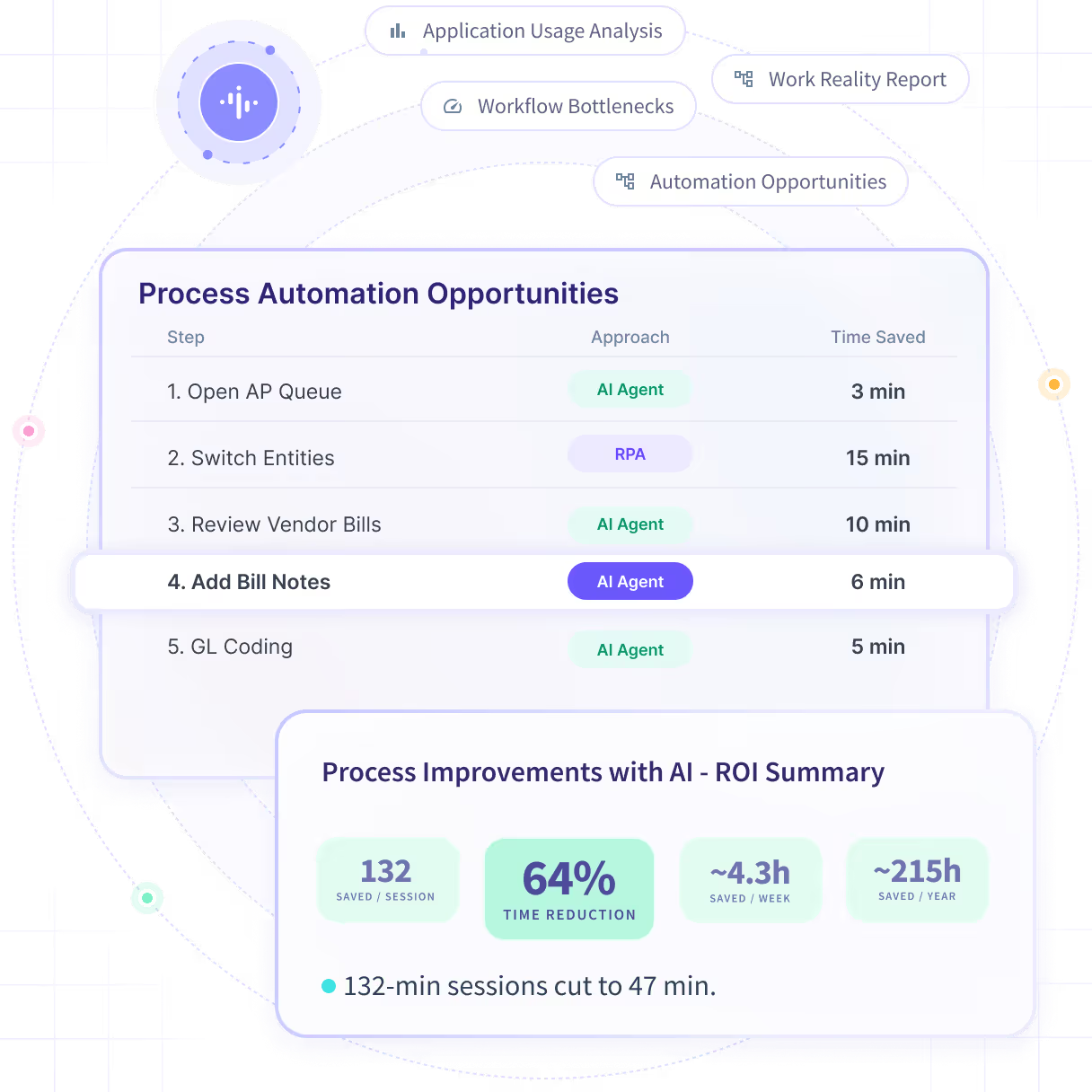
Work intelligence is an AI-powered platform that combines workflow signals, pattern recognition, and decision-grade data to impact business outcomes for organizations. For companies undergoing an AI transformation, work intelligence software continuously captures how employees work, how they deploy AI, maps real processes, benchmarks usage against company strategy, and pinpoints opportunities where process change or automation would have the most impact.
What is work intelligence?
At its core, work intelligence is the ability to understand how work gets done, what should happen next, and how agentic AI can help optimize the outcome. Work intelligence platforms connect four layers:
- Data layer: raw operational data generated by employee work activity, like time, activities, and application usage
- Pattern recognition: mapping recurring processes, including existing AI-augmented workflows
- Decision intelligence: benchmarking usage against company strategy and providing constraint-aware recommendations (capacity, staffing) on which processes should be prioritized for change, automation, and agentic implementation
- Business outcomes: connecting process changes to the outcomes leadership cares about most, like EBITDA, throughput, and retention
Instead of treating workforce metrics as static numbers, work intelligence uses them to surface bottlenecks before they become expensive. Powered by AI, the software forecasts workload changes before they blindside a team, and helps quantify the tradeoffs between staffing decisions, process choices, and results.
Work intelligence platforms translate signals into planning inputs leaders can act on immediately, which is what allows organizations to move from reactive firefighting to decision making at the actual speed of work.
Work intelligence tends to matter most in environments where performance depends on coordination: across teams, across systems, across time zones. It exists to help leaders answer the questions that matter:
- How much capacity do we really have right now — and how much will we need next month?
- What's slowing throughput, or quietly driving up cost-to-serve?
- How are teams currently deploying AI agents, and which of our processes would benefit the most from automation?
{{banner-3}}
How work intelligence differs from monitoring and from workforce analytics
Organizations don't arrive at work intelligence overnight. They usually arrive as a natural progression from two earlier categories of tools: monitoring and workforce analytics. Understanding the difference between all three is the fastest way to understand the jump in functionality that work intelligence adds. It’s not simply a reporting tool wearing a new label. It's not just a time tracker hooked to an LLM. Work intelligence moves past aggregating inputs, past improving efficiency, and connects those signals directly to outcomes.
Monitoring: Input Signals for Visibility
Monitoring is primarily about visibility. It answers a hugely valuable question on its own: what is happening right now? Employee monitoring is an essential tool for ensuring compliance, verifying attendance, and seeing exactly how team time is spent.
Monitoring can absolutely alert a team to a problem. But monitoring alone can’t necessarily connect that observation to a broader operational decision or a measurable business outcome.
Workforce Analytics: System-Level Insight
Workforce analytics is the next level up. While monitoring is generally a component of workforce analytics platforms, it’s far from the only one.
Workforce analytics adds system-level insight, with automatic data capture and reports that allow managers to compare performance across teams, projects, and timeframes. It answers the question where is performance breaking down or exceeding expectations?
Workforce analytics data is a vital signal for breaking down productivity and behavior, from the granular level up to the organizational one. Think historical trend lines, automatic alerts when performance slips, and advanced reporting.
Work Intelligence: Connects Patterns to Decisions and Outcomes
Work intelligence is the natural endpoint for the foundation built by employee monitoring and workforce analytics. It’s designed to help leaders decide, not just observe or measure. It does this by linking patterns detected in workforce signals directly to business goals, and it answers three questions at the heart of operational change:
- Why is performance changing?
- What should we do about it?
- How will a specific action affect the outcome?
It does this using structured analysis to separate meaningful deviations from ordinary noise, benchmarking current patterns against expected norms, and translating the result into decision-ready signals — staffing guidance, capacity forecasts, process recommendations, and risk indicators a leader can act on in real time.
Monitoring tells you what's happening, analytics tells you where and how it fits into the broader picture, and work intelligence tells you what to do next — and predicts the business impact of doing it.
The work intelligence stack: from workforce data to business outcomes
Work intelligence isn't a single feature. It's a stack, with each layer depending on the one below it. Skipping a layer, e.g. trying to jump straight to "recommendations" without solid pattern recognition, is where many initiatives seeking to harness the data can stall out.
A work intelligence stack builds a system of understanding, as opposed to a traditional software stack that focuses on a system of records. Instead of recording and storing information, it relies on a deterministic data layer to continuously analyze how work is happening, and how it can be improved.
Layer 1: Data
Everything starts with work activity data: the signals that describe how work is actually happening across the organization. This typically includes time, activity, and app usage captured across the workday.
The goal at this layer isn't to "collect everything you possibly can." It's to reliably and consistently ingest the specific workforce indicators that will later enable pattern discovery and measurable decisions. Noisy, inconsistent, or incomplete data at this layer undermines everything built on top of it.
- Inputs: time, activity, app usage
- Purpose: capture clean, reliable workforce signals
Layer 2: Pattern Recognition
Once signals are flowing reliably, work intelligence uses AI to apply pattern recognition, separating meaningful change from ordinary day-to-day variation. Anomaly detection identifies outliers, like a three-day spike in overtime or the sudden drop in a team's focused work time. Benchmarking reveals how current performance compares to expected norms, whether that's a historical baseline or a peer-team comparison.
This is the layer that turns raw activity into signals a leader can trust, rather than a wall of numbers that requires a data analyst to interpret.
- Techniques: anomaly detection, benchmarks, and trend analysis
- Purpose: find the deviations that actually matter
Layer 3: Decision Intelligence
This is where work intelligence earns its name. Powered by AI, decision intelligence is where the patterns detected in Layer 2 are translated into actionable recommendations. It helps organizations understand which processes should be prioritized for change, where AI agents could have the most impact, where capacity constraints can lead to missed deadlines, guide staffing decisions with real evidence instead of guesswork, and surface process signals that point to exactly where workflow friction or bottlenecks are emerging.
Rather than handing a leader a block of data to puzzle over, this layer focuses squarely on the decision required to improve performance.
- Capabilities: capacity and staffing recommendations, process signals (bottlenecks, workflow shifts)
- Purpose: convert patterns into actions
Layer 4: Business Outcomes
Finally, work intelligence platforms connects workforce dynamics back to business results — because none of the previous three layers matter if they don't move the numbers leadership cares about. By linking decisions to measurable impact, leaders can improve outcomes like EBITDA, increase throughput, and support retention.
This layer is what ensures the entire platform gets judged on results, not on how good the reporting looks.
- Outcomes: EBITDA, throughput (velocity and volume), retention (workforce stability)
- Purpose: deliver outcomes leaders can actually manage against
Work intelligence use cases by function
Work intelligence software is built to serve multiple leaders with different mandates. But if you're an Ops Director, an HR leader, or a CFO, you share one need: dependable, evidence-based workforce decisions instead of gut calls made under pressure.
Operations: capacity and process signals
If you're an Ops Director, you already know that "things feel slow" is not a diagnosis. And that’s a problem, if you can't pinpoint why cycle times have crept up, deadlines get missed, or people seem busy.
Work intelligence gives you the ability to understand capacity in real time, detect workload risk before it becomes a missed deadline, and identify the specific process signals that are dragging down throughput. Then, and most critically, it recommends specifically how to act on them: realigning staffing across shifts, optimizing shift structure around actual demand patterns, and adjusting processes exactly where workflow friction is costing your team speed.
For example, if a fulfillment team's average task-completion time creeps up 15% over three weeks, work intelligence can flag the drift, isolate which step in the workflow is slowing down, and give you a staffing or process recommendation before it turns into a missed SLA.
HR / People: workload and retention
If you're leading HR or People, you're used to hearing about burnout only after someone hands in their notice.
Work intelligence platforms let you monitor workload patterns and catch early indicators that influence the employee experience, before they surface in an exit interview. Work intelligence helps you connect workforce changes, like a sudden increase in after-hours activity or a shift in workload distribution across a team, to the retention drivers your leadership already tracks.
Say a high-performing team starts showing a steady rise in weekend logins alongside falling engagement in project tools. That combination is a retention risk signal you can act on with a workload rebalance, not a resignation you have to explain in your next board update. Work intelligence can tell you where to shift the overloaded tasks, or whether they can be automated entirely.
Finance: utilization and cost-to-serve
If you're a CFO, work intelligence connects workforce behavior directly to your cost structure.
By quantifying utilization and identifying the specific drivers of efficiency or inefficiency, you can evaluate cost-to-serve impacts with real precision, improve resource planning, and strengthen forecasting with decision-ready inputs instead of backward-looking averages.
For instance, if utilization on a client account is consistently running below target while headcount stays flat, work intelligence surfaces exactly where the gap is coming from, so your next resourcing decision is based on evidence, not a hunch.
How to know if you're ready for work intelligence
You're likely ready for work intelligence if you've outgrown the limits of basic time tracking or monitoring tools, and you're currently making staffing and performance decisions based on incomplete information. Here's a practical readiness check.
You need faster decisions. Your reporting cycles are too slow to respond to demand shifts or workflow changes while they're still small enough to manage easily. If an Ops Director is finding out about a capacity crunch the same week it becomes a missed deadline, the reporting loop is too slow to be useful.
Dashboards don't drive action. Your teams dutifully review the metrics every week, but consistently struggle to connect the patterns they see to a specific decision and an expected outcome. An HR leader might watch engagement scores dip quarter over quarter without ever making the call on which team, or which cause, to act on first.
You're managing real complexity. Multiple workflows, teams, or systems make it genuinely hard to see what's actually driving performance, good or bad. A CFO juggling utilization data across a dozen client accounts and three time zones knows this problem well. The noise makes it nearly impossible to isolate the real driver of a margin dip.
You’re moving your AI transformation to the next level. You’ve bought the LLM licenses, and your team is burning through tokens. But you’re not seeing actual workflows transform around AI, and your bottom line hasn’t moved despite the heavy investment.
If most of that sounds familiar, work intelligence isn't a "nice to have" upgrade: it's the next logical step. If you're evaluating a move from basic tracking or monitoring into a system that actually helps you decide what to do next, and why, this is the right moment to make the jump.
How Insightful delivers Work Intelligence
Insightful’s Work Intelligence platform turns workforce signals into decision-ready insights leaders can act on immediately. The platform identifies patterns, flags meaningful deviations, supports capacity and staffing decisions, and helps connect operational signals to the outcomes that matter most like throughput, efficiency, and retention.
Thanks to the deterministic data layer uniquely available from Insightful’s underlying technology, Work Intelligence achieves a near-zero hallucination rate. Users harness decision-grade data using plain language prompts, and every AI query users submit is anchored in analysis of objective work activity data. As with the rest of Insightful’s platform, Work Intelligence is privacy-first by design: no keystroke logging, no PII capture.
Trust matters just as much as capability here, especially given how skeptical leaders rightly are of anything that touches workforce data. That's part of why Forbes named Insightful "Best for Employee Privacy" — proof that decision-ready intelligence and responsible data practices aren't a tradeoff, they're both table stakes.
If you're evaluating how a real work intelligence platform can transform how your business operates, Insightful can help. Request a free 14-day audit and start getting decision-grade data fast.
Work intelligence isn't about watching your workforce more closely. It's about finally being able to act on what you already know is happening: with the evidence, the timing, and the actionable data to back it up.
Not sure how your organization’s AI transformation is stacking up? Use Insightful’s AI Adoption Scorecard to score your own team’s readiness for the AI-first economy.
Want to see Insightful’s own Work Intelligence platform in action?
Request your free 14-day Work Intelligence Audit.


FAQs
Work intelligence is an AI-powered platform that turns workflow signals, pattern recognition, and decision-grade data into business outcomes. It continuously captures how employees work and deploy AI, maps real processes, and benchmarks usage against strategy. Rather than just reporting what happened, it explains why performance is changing and recommends the process or staffing change most likely to move outcomes like EBITDA and throughput.
Workforce analytics uses employee monitoring and other work data signals to surface system-level insights: dashboards and reports showing where performance breaks down across teams. It leaves interpretation to the reader. Work intelligence goes further, using pattern recognition and decision intelligence to explain why performance is changing and turn that into actionable guidance and process recommendations tied directly to outcomes like EBITDA, throughput, and retention.
No. Employee monitoring is about visibility: what's happening right now, often with compliance in mind. Work intelligence operates on aggregate workforce patterns, and is built to connect those patterns to capacity, workflow, and process decisions.
Work intelligence runs on a deterministic data layer of workforce signals like time, activity, and app usage. The goal isn't collecting everything possible; it's reliably ingesting the specific indicators that power pattern recognition and decision-ready recommendations, all without keystroke logging or PII capture.



