.svg)


Renew the AI seats that produced work, not the ones assigned
Every team is plotted on how widely it uses AI and how deeply, so a team that opened a tool twice reads differently from one that runs on it. Same Insightful desktop application, no content or keystrokes captured.

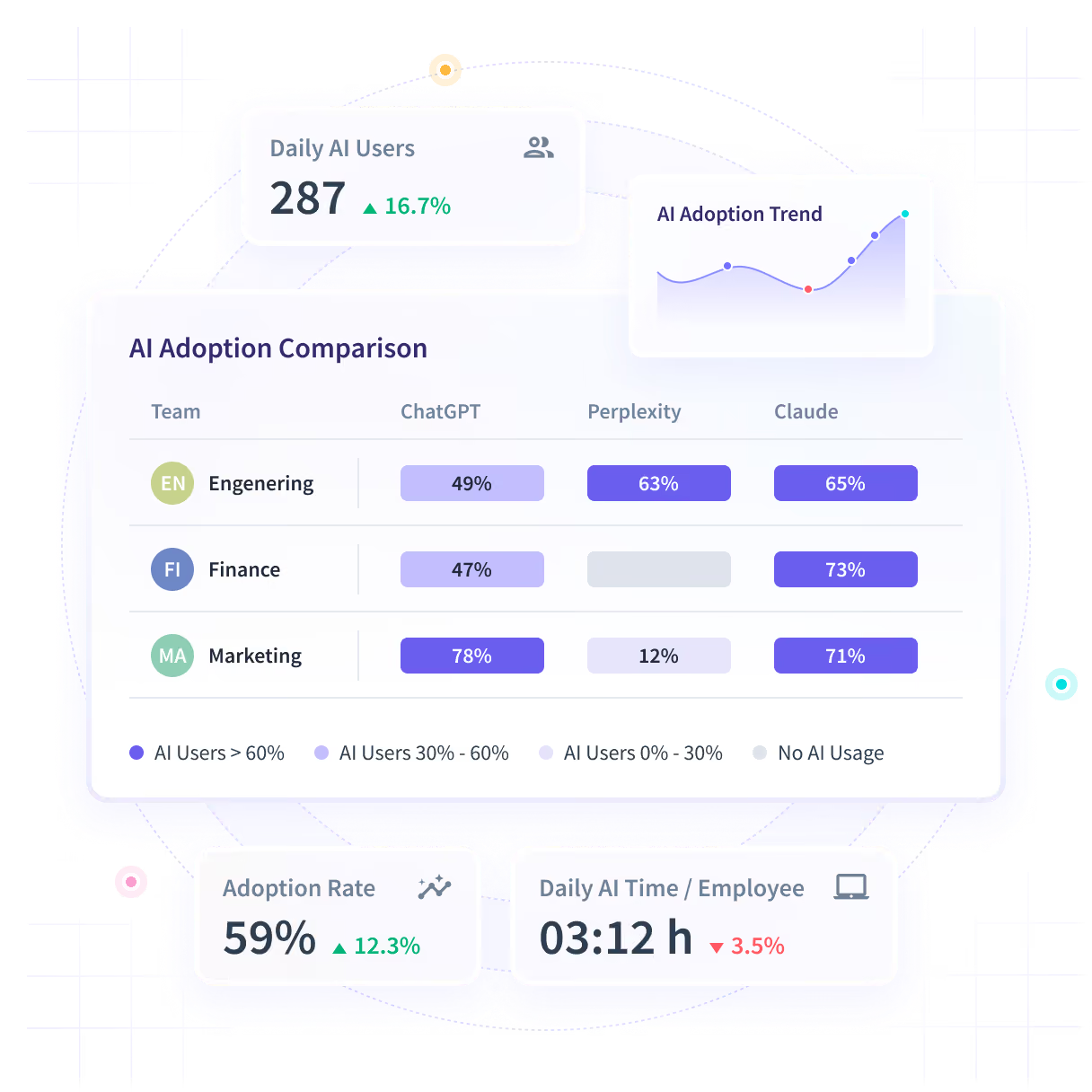











Nobody logged which teams turned the AI seats into work
Seats were bought on a promise and renewal is in six weeks. The license console shows who has a seat, not who opened it twice and stopped.

Price the renewal on use, not on who got a seat
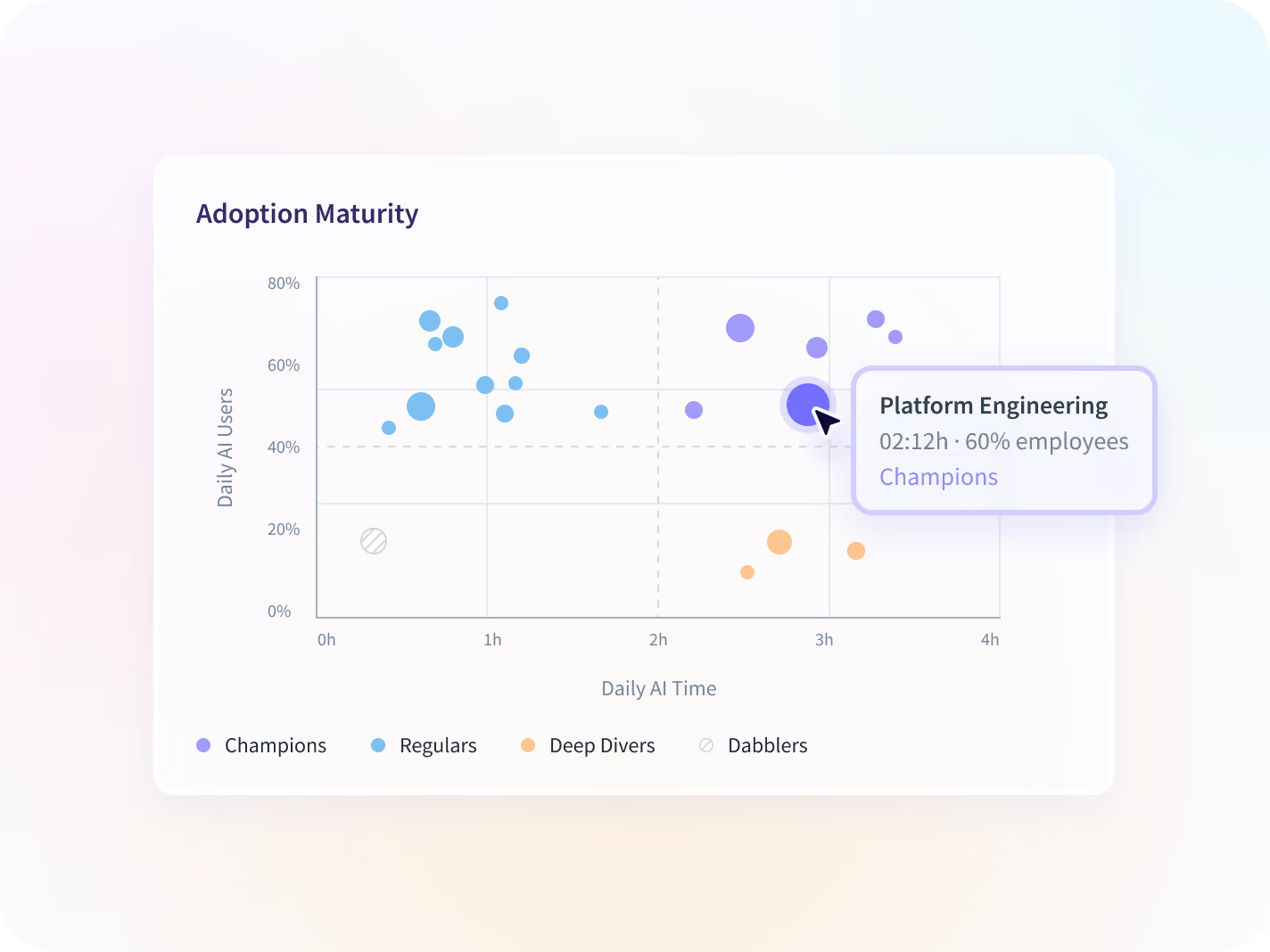
Every team lands on the Adoption Maturity Matrix as a Champion, Regular, Deep Diver or Dabbler. A license console shows all four as fully licensed.
.svg)
Seats opened, not assigned
A license console says who holds a seat. This says who opened it, how often, and whether anybody went past the first week.

No tool to instrument
Usage comes off the desktop application already deployed, as the work happens, so a tool that appeared last week is in the report without a project to add it.

The tools nobody rolled out
Applications nobody registered are flagged when they first appear, which is how a private AI account reaches a report at all.

Adoption is not outcome
None of it proves the AI caused a result. It shows who uses which tool and how much, so a renewal argument starts from measured use. The outcome number stays with the team that owns it.
See AI use across every tool, with nothing to instrument
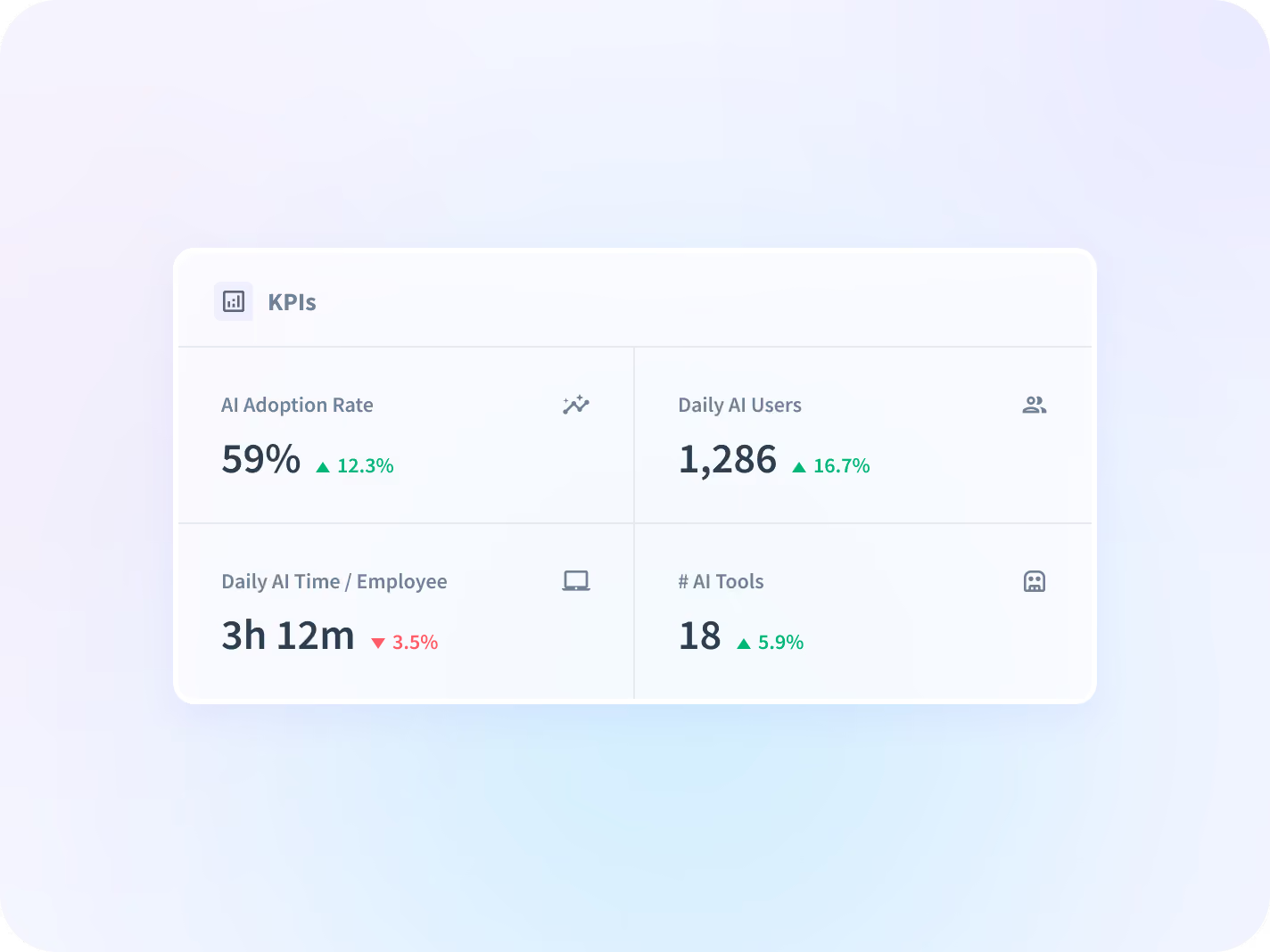
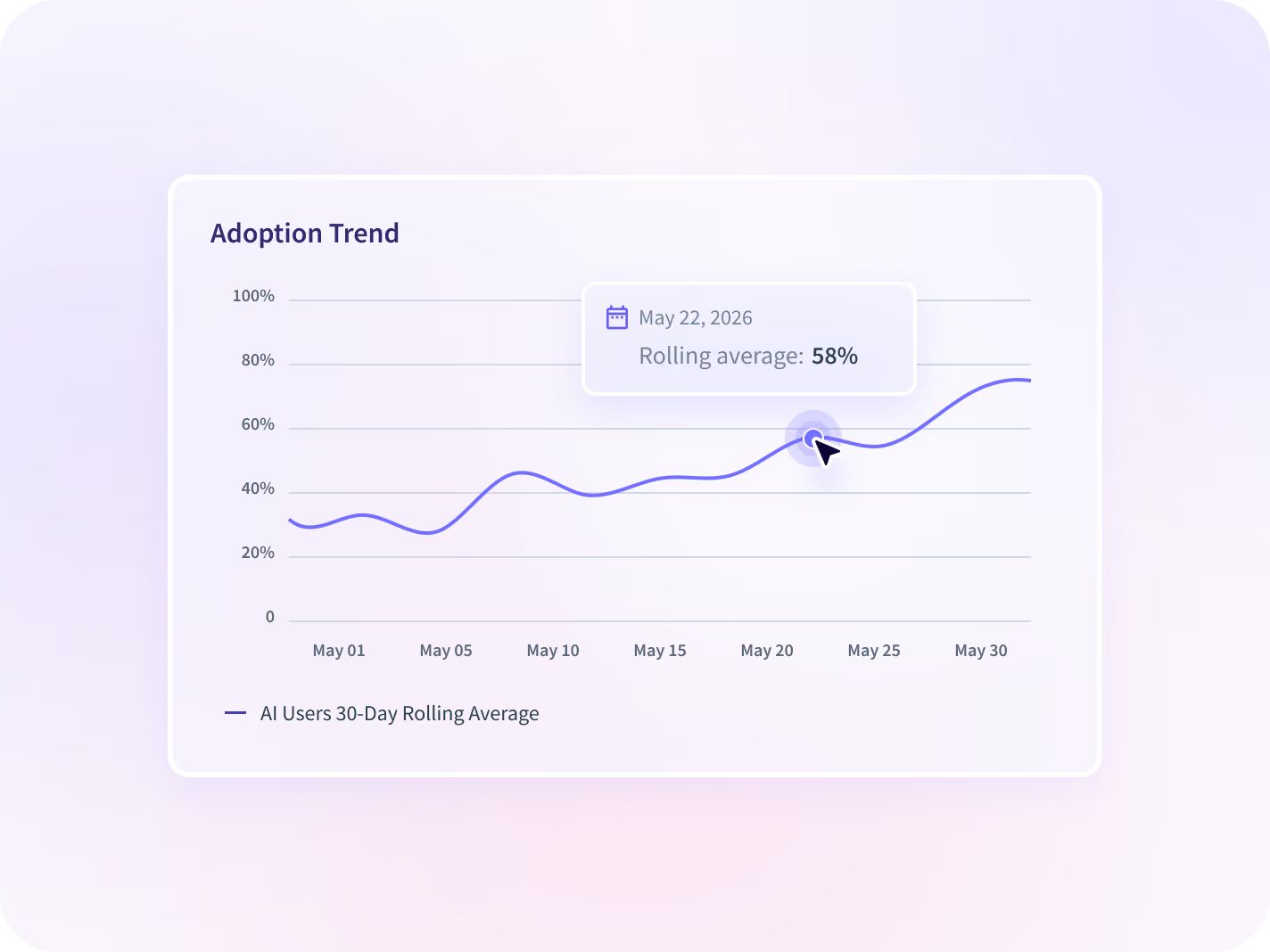
Four numbers on how much AI is being opened, a rolling average on which way that is moving, every team plotted by breadth and depth, and every tool set against its seats. All off the desktop application already deployed.


Four numbers carry it: daily AI users, AI time per employee, adoption rate and how many tools are in use, read by team and across the organization.


A rolling average says whether adoption is accelerating, holding or losing ground, so a rollout that stalled in month two is visible before the renewal date.


Every team plotted across breadth and depth as Champions, Regulars, Deep Divers or Dabblers, which is the difference a license console cannot show you.


Every AI tool side by side against the seats opened, so the one nobody moved past the trial is visible before its renewal date rather than after it.
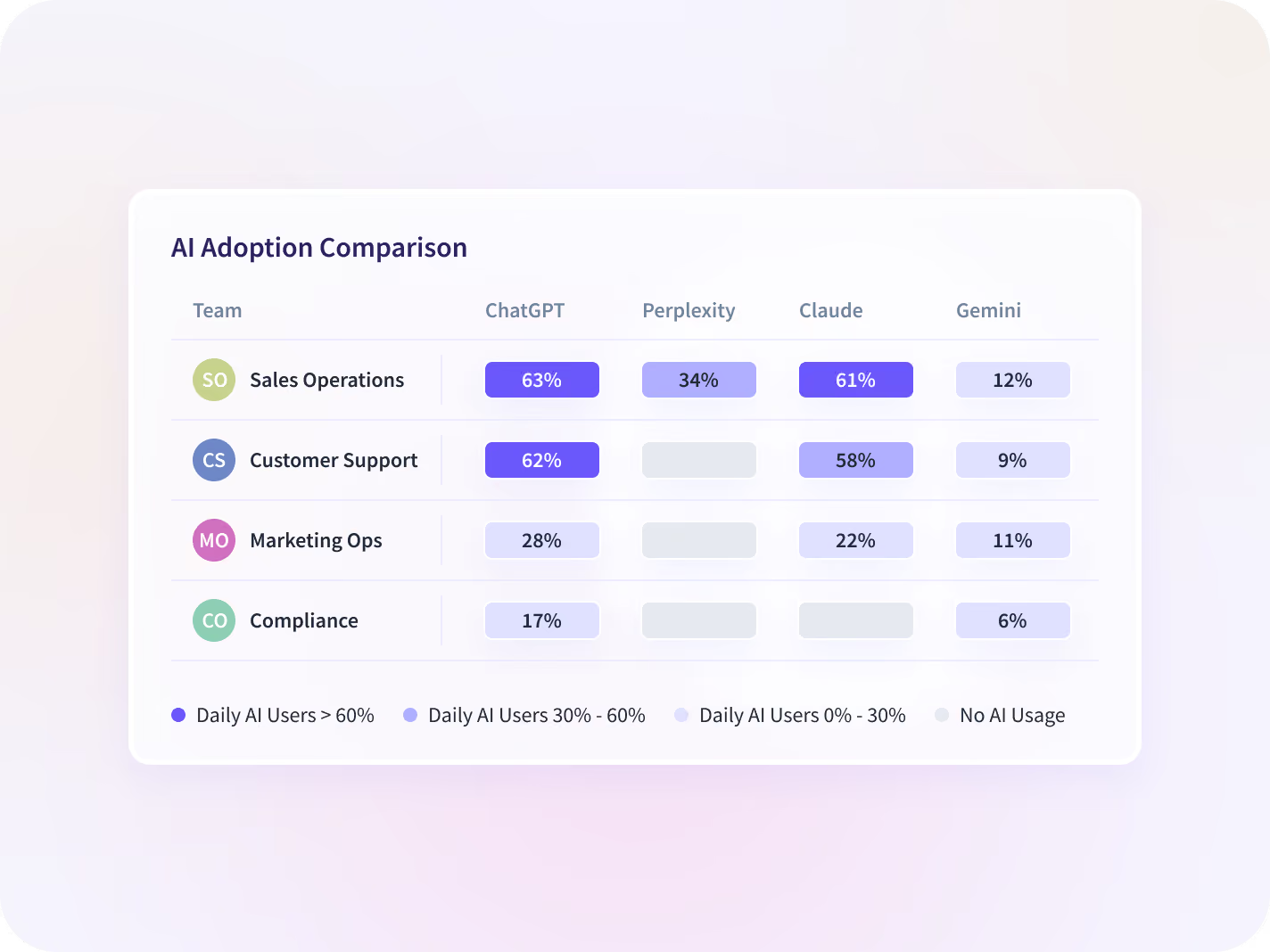
Turn an adoption number into a budget decision
An adoption number says how much AI is being opened. Add what the line costs, the tools nobody rolled out and the rest of the stack ranked the same way, and you can price each tool on its own instead of approving the whole invoice.

AI Spend
What the AI line costs against the seats people open, so a renewal is priced on use rather than on the purchase record.

Shadow AI
AI tools nobody rolled out, surfaced by application visibility today. Flagging against your own approved list is rolling out.
AI Adoption
The measurement counterpart: setting a baseline, picking the numbers, and reporting adoption to the people funding it.

Apps & Website Usage
The rest of the stack ranked the same way, so an AI seat is judged against the tools it was meant to replace.

Productivity Trends
Whether the teams furthest into AI show a different direction in productive time from the teams that are not.

Workspace Security
The same visibility under a collection scope narrow enough to clear a legal review. An add-on to Workforce Analytics.
Four teams stop guessing at the same AI rollout
The AI renewal defended by the team that asked for it
Compare every AI tool side by side against seats opened, and renew, resize or drop each one before the date rather than after.
Cost per active AI seat
The per-tool integration project
Get AI usage from the desktop application already deployed, with no new rollout and no vendor-by-vendor instrumentation.
Rollouts avoided
The AI usage survey nobody returns
See which applications people opened to do the work, including tools nobody rolled out, with no content and no keystroke capture.
Unapproved tools surfaced
Enablement delivered to everyone equally
Separate the teams that can mentor from the teams furthest behind, and spend the training budget on the second group.
Adoption rate by team

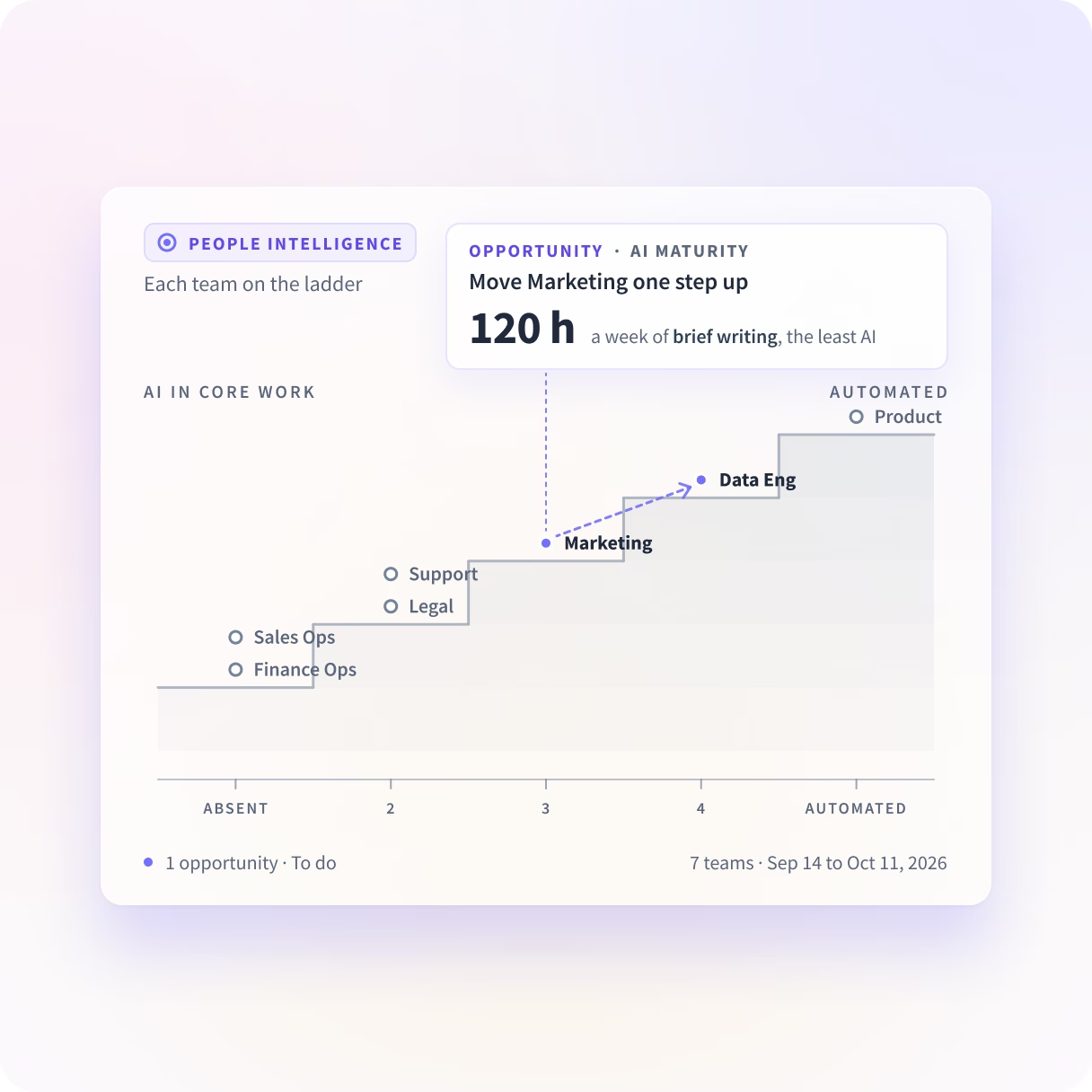
How deep does AI go in each team's work?
People Intelligence shows how deeply each team uses AI in its core work, from Absent to Automated, against similar teams. It suggests each team's next step up, learned from the team one step ahead.
Which AI tool was opened, never the prompt
The report records which AI tools were opened, how often and for how long. Prompts, responses, content and keystrokes are outside the collection scope, and what gets collected is agreed before deployment rather than discovered after.





Trusted by 5,000+ Teams Worldwide





Price your next AI renewal on use
No connector for the AI tools, 50+ for everything else
AI use comes off the desktop application already deployed, so nothing is instrumented per vendor and a tool that appeared last week is in the report. The 50+ integrations cover payroll, HRIS and project systems.


Questions about enterprise AI adoption
Short answers on enterprise AI adoption, its two stages and what Insightful doesn't read.
AI adoption is how much people use the AI tools you pay for in their everyday work. In an enterprise it has two stages. The AI Adoption Report shows which teams open which AI tools, and how often. The ladder shows how deeply each team uses AI in the work. In Insightful, Workforce Analytics shows the first and People Intelligence shows the second.
Workforce Analytics shows the input, from the time perspective. People Intelligence shows the output, and what happens in between.
Here, the AI Adoption Report shows which tools each team opens, and AI Maturity shows how deep AI goes in the work. We see the apps, sites and AI tools your teams use, and what they do in them.
No. The AI Adoption Report shows which AI tools each team opens, how often and for how long, from the app you already run. It doesn't read prompts, responses, messages or documents, and screenshots are optional and off by default. It shows where AI use is growing or has stalled, and the ladder shows how deeply each team uses AI in the work.
Yes. The AI Adoption Report shows every AI tool it recognizes, including ones IT didn't roll out, with the team using each. You decide which tools are approved, and with the Workspace Security add-on an alert fires when a tool outside that list is used. One IT lead at a property management company found staff using personal AI accounts during the evaluation.
It recognizes commonly used assistants automatically, including ChatGPT, Claude, Gemini and Cursor. Anything it doesn't recognize stays Uncategorized and is listed in Apps & Website Usage instead of the report. An admin can label it in Productivity Labeling, which is how you add a tool your team built. Compare the recognized list with your own software before you plan around it.
Build it team by team, from where each team stands in both stages. The Adoption Maturity Matrix comes first, so Champions mentor other teams and Dabblers get coached. A good AI adoption strategy then looks at depth. AI Maturity places each team on the ladder and suggests the next step. Team Efficiency shows which teams get more of the week into the work itself.
Insightful holds a SOC 2 Type II report, audited annually. Our information security management system is aligned with ISO 27001, but we are not currently ISO 27001 certified. SOC 2 materials, penetration test summaries and policies are provided through our Information Security and Legal teams under a mutual NDA.
It's included. The AI Adoption Report is part of Workforce Analytics, on the desktop app you already have. AI Maturity is part of People Intelligence. People Intelligence runs on the same app. There's nothing new to install and nothing to set up first. Workspace Security is a paid add-on on any plan.



