.svg)


Clear the idle AI seats before the renewal quote lands
The renewal quote arrives with the vendor's own adoption numbers attached. Nobody inside the building can say which of those seats anybody opened last month.


.avif)










Turn a renewal quote into a seat-by-seat decision

Without Insightful

Nobody has a list to argue with it, so it renews at last year's number.
It counts logins on its own terms and it is the only number in the room.
Use climbed for a month, flattened in the second, and nobody read it.
With no seat-level list the only two moves are both expensive ones.
Somebody builds it in month two of a twelve-month term, too late to use.

With Insightful

Every AI tool carries the working hours put into it, not a login event.
Working hours spent in the tool, read off the desktop rather than a portal.
Each month reads against the one before it, so a flat curve is visible.
Use by team gives you the seats to keep and the ones to hand back.
Two weeks of activity is enough to walk into the call holding one.
Find out which AI seats went unopened
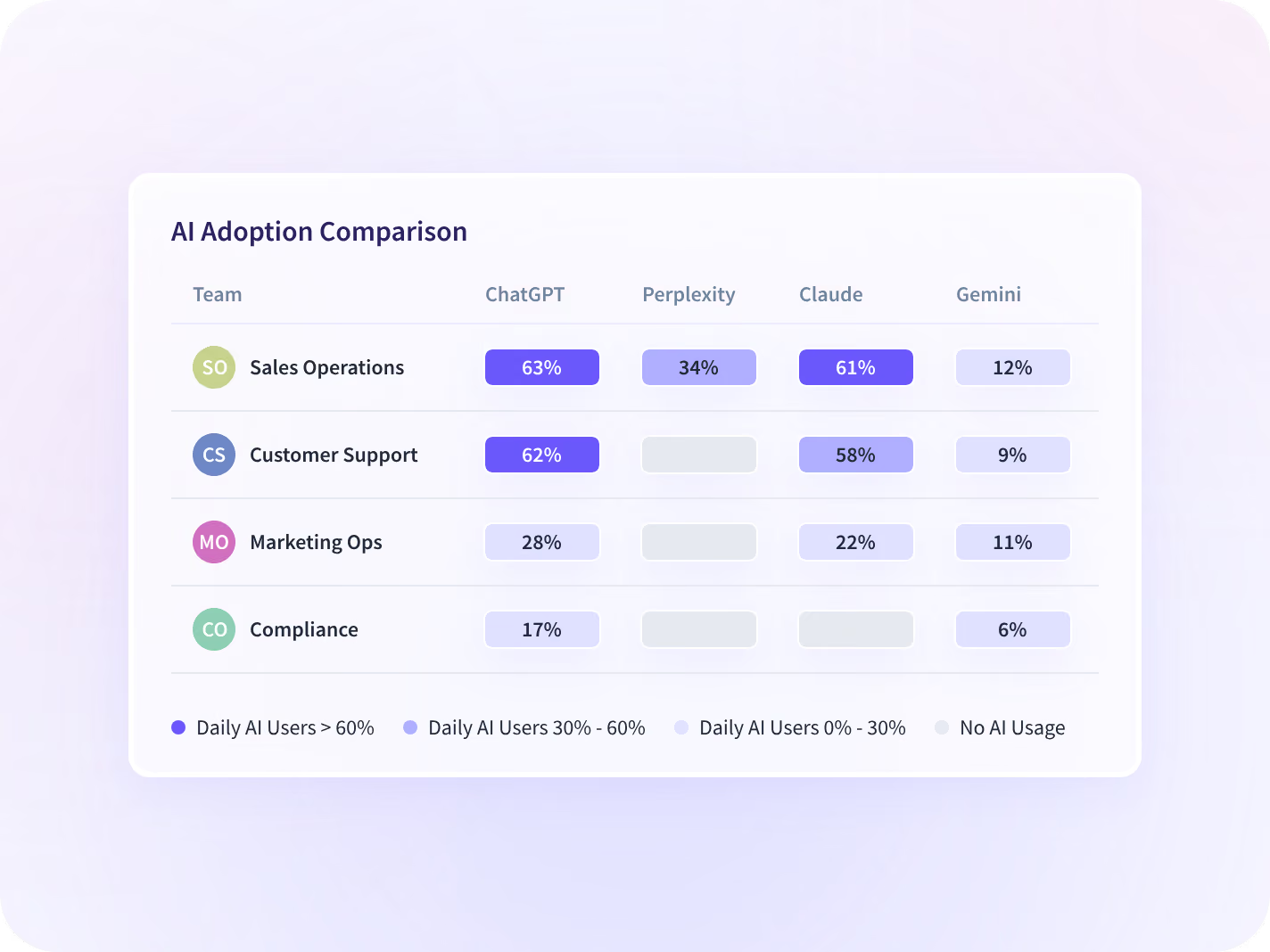
AI Adoption reads the AI tools in use by team: daily users, time per person, and the hours going into each seat. A paid seat with no hours behind it is the finding, and it arrives with a team attached.
- Daily AI users, time per person, and the hours behind every seat you bought
- Read by team, so a renewal is argued where the seats sit
Put working hours against every seat you pay for
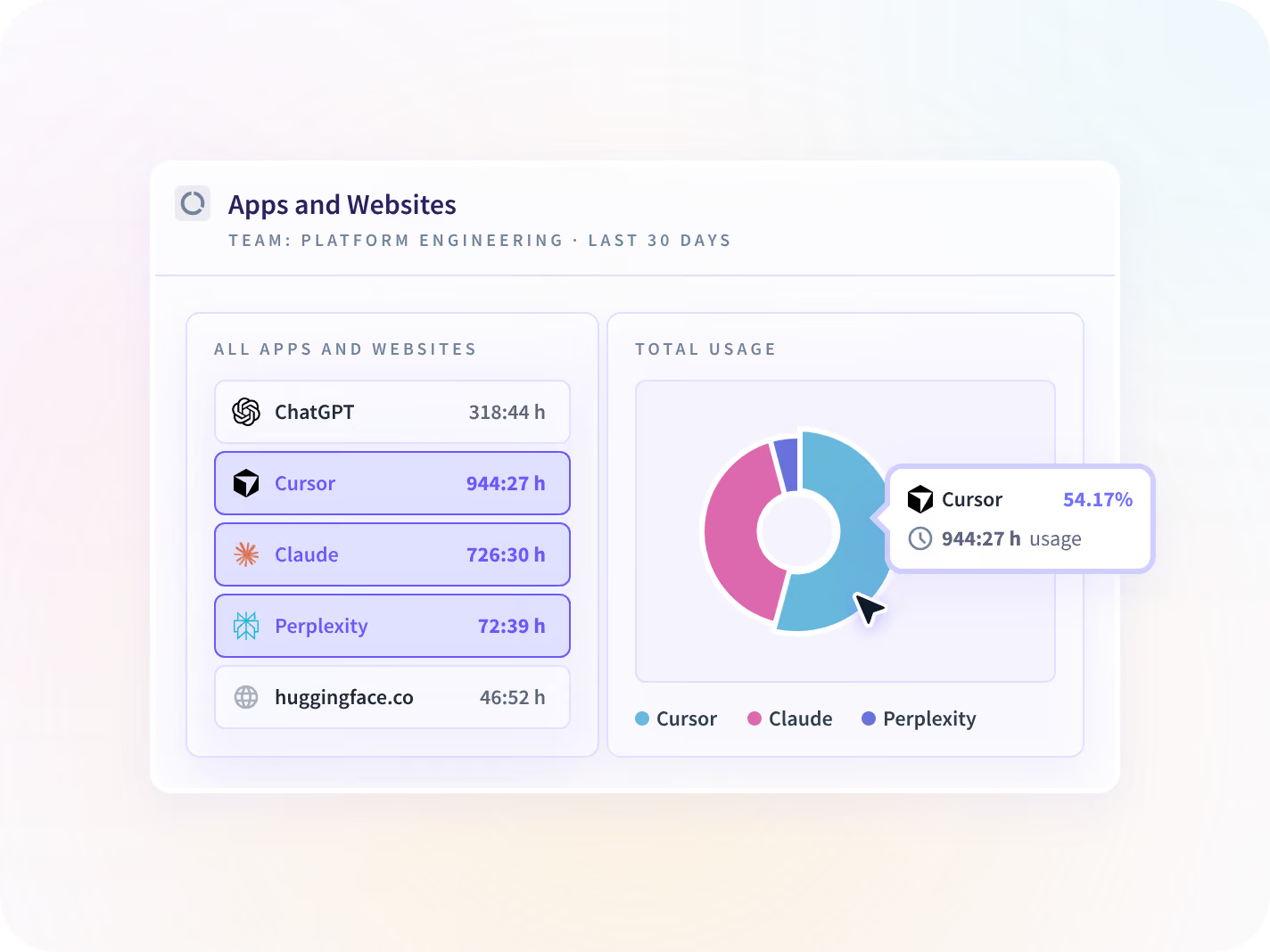
Every application and site is ranked by the working time spent in it, each with a last-used date. A tool carrying four hours across a quarter reads as a number rather than as somebody's impression.
- A G2 reviewer found two fully paid tools nobody had touched in 90 days
- Which application was open and for how long, never what was inside it
See which AI seats go unopened
See the adoption curve flatten in month two
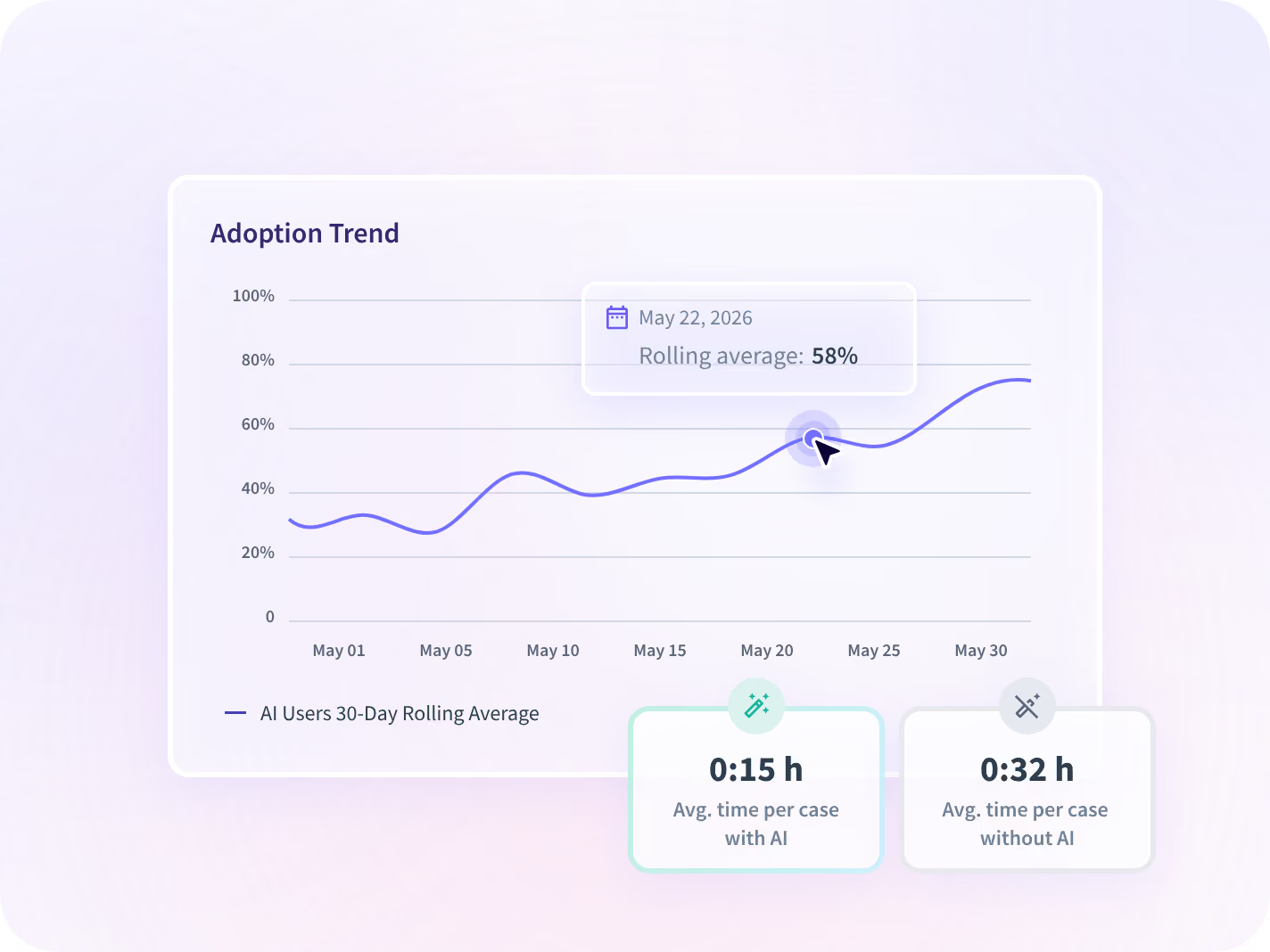
Every measure is reported against the same-length period before it, so a rollout that climbed in its first month and flattened in the second is visible while ten months of the term are still left to run.
- Each period against the one before it, so a stall shows up early
- Team level by default, and nothing on this page ranks an individual
Hand back the idle seats and keep the rest
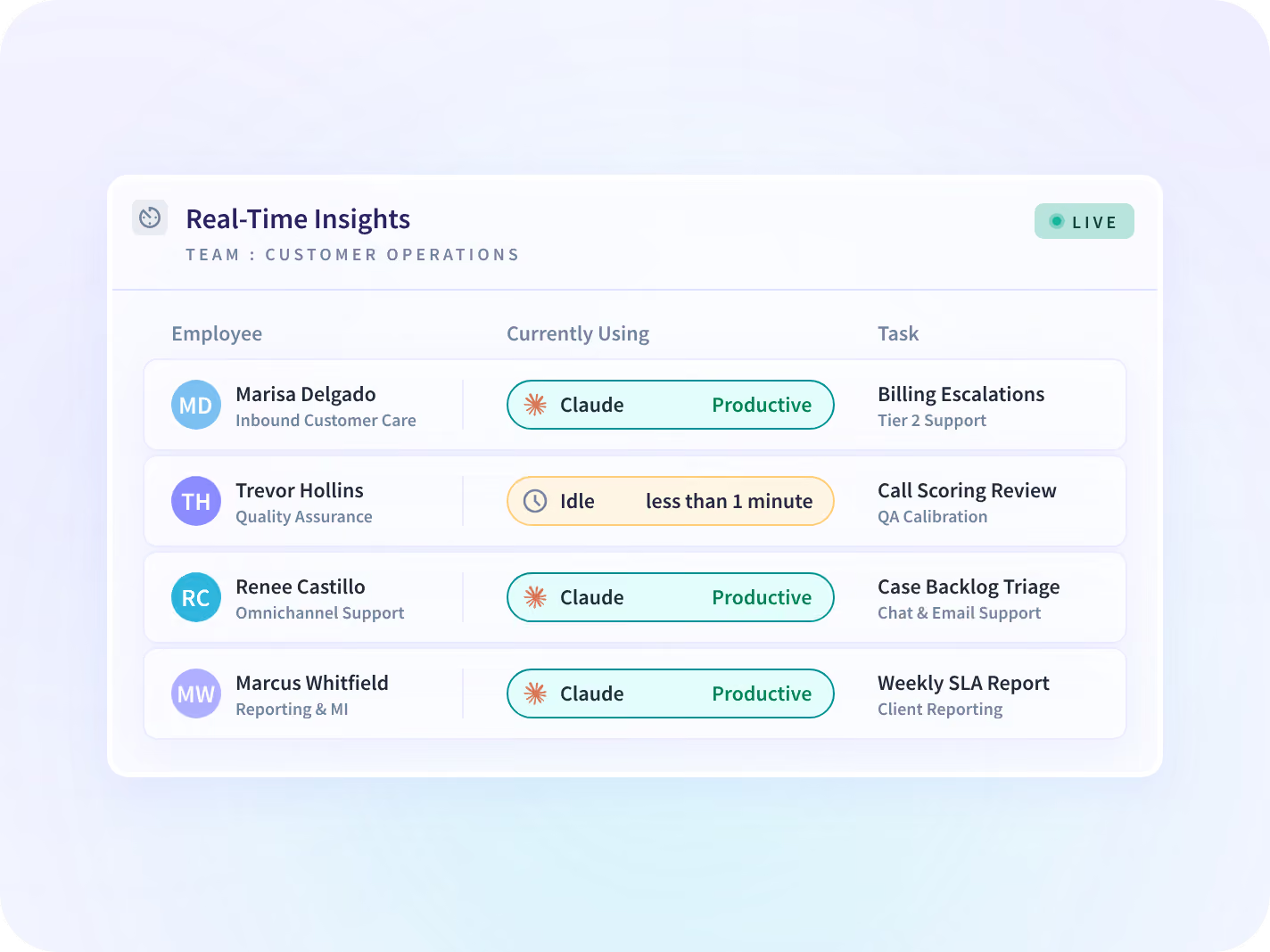
A renewal is rarely all or nothing. The live team view shows which teams are in a tool right now, so the seats you keep are the ones with people in them and the number you hand the vendor is a smaller one.
- See which teams are in a tool now, rather than at the end of the month
- A cancelled tool comes back as shadow AI. A resized one does not
Counting seats without reading anybody's work
What comes back is an application name, the team using it and the working hours inside it. Collection scope is agreed before a device is deployed, then published, versioned and dated.







The seat list opens three other conversations
Knowing which seats went unopened settles the renewal. What you are paying for without knowing it, what the rest of the software estate costs, and where the remaining hours go are three more.

What about the tools nobody approved?
The AI tools running without a purchase order behind them. That is governance, and it has its own page.

What about the rest of the software?
The same question asked of every paid tool, AI or otherwise, read the same way off the same activity.

Where is the rest of the week going?
The working hours that never reach a licence line, ranked by where they went.
Teams that renegotiated rather than cancelled







The vendor consoles, and the seats underneath
Use comes off the desktop application rather than each vendor's console, so a tool bought last quarter is on the list. 50+ integrations cover the rest. You can talk to your work data with MCP connectors.



The quote that arrives with the vendor's numbers
What CIOs and finance leaders ask us most
It tells you what the vendor counts. Most consoles report seats assigned and a login event, and both stay green long after a person stopped opening the tool, which is why the adoption slide in a renewal deck is never the number anyone wanted. Insightful reads the working time spent in each application on the devices you deploy it to, so the figure you bring to the call is yours, and it is built the same way for every tool on the list. A G2 reviewer found two fully paid tools nobody had touched in 90 days. That is the shape of the finding, and it is a date rather than a dispute about whose definition of active is right.
Shadow AI is about tools you did not know were running. This page is about tools you know about, pay for, and hardly anybody uses. The first is a governance problem and it lands on security; the second is a renewal problem and it lands on whoever signs the invoice. The reading underneath both is the same activity, and the two lists come back on the same day, which is why teams tend to run one deployment and then split the findings into two conversations. If nothing unapproved worries you and a renewal date does, this is the page you want.
By reporting which application was open and for how long, on the devices where Insightful is deployed. A seat reads as idle when almost no working time has gone into the tool, which is a fact about a licence and says nothing about how hard anybody works. No prompts, no responses, no message, document or file content, and no keystroke logging at any tier. Two limits belong in the same breath. A tool used on a personal phone sits outside what a desktop application on a company laptop reaches, and Insightful cancels nothing for you: what it hands you is the list and the dates, and the decision stays with whoever owns the contract.
A list of the AI tools in use, each with the teams using it, the working hours going into it, the date it was last used and its direction of travel against the same-length period before. That is enough to argue a seat count line by line, and to separate the tools worth resizing from the ones worth dropping. What it does not include is price. Insightful holds none of your contracts or invoices, so the cost side comes from your own records and gets set beside the use. Two weeks gives you a readable period. The month before the quote is what goes into the call.
The question is the same and the tool class is different. IT Spend reads every paid application the same way, and this page reads the AI half, which behaves differently enough to be worth separating: the seats were bought fast, often outside the usual review, the renewal cycles are short, and the vendor's own adoption number is the only one in the room. If your renewal calendar is full of AI contracts signed in the last eighteen months, start here. If it is the whole software estate, that page covers more ground.
