.svg)







On this page
Measure the work, not the signal.
See productive time and utilization by team, not just what looks active.


Key takeaways:
- Teams with simple leave policies and no existing time tracking may opt for a standalone tool; teams looking to measure deeper workforce analytics data benefit from pairing PTO with advanced features in one platform.
- Pricing spans a wide range. Standalone tools like Vacation Tracker and Buddy
- "Free" doesn't mean unlimited. Platforms like Connecteam offer free tiers, but with real constraints, like a 10-user cap. Most teams outgrow them fast.
- Compliance credentials are critical. Insightful adheres to international security standards like SOC 2, ISO 27001, HIPAA, and GDPR, offering a level of documentation most dedicated PTO-only apps can't offer.
- When leave, time tracking, and workforce analytics live in one system, a leave spike and a utilization dip show up together, catching problems that stay invisible when the data sits in two separate dashboards.
Spreadsheet-based PTO tracking may seem manageable. Until a payroll cycle closes with the wrong balance, two managers approve the same week off, or an employee disputes days that were never logged. For growing teams, these aren't edge cases. They are the predictable cost of running leave without employee time-off tracking software.
This guide compares six employee time-off tracker software options designed for different team sizes and budgets, from lightweight Slack-native tools to full-workforce platforms. Beyond the reviews, you'll find a framework for the decision that matters most: whether a standalone PTO tool is enough, or if you’re better served by unifying PTO data with advanced tracking, productivity, and behavioral data within a platform like Insightful's Workforce Analytics.
How We Evaluated These Employee Time Off Tracker Tools
We assessed each tool against six criteria that matter most for teams evaluating employee time off tracker software: request and approval workflows, accrual and balance automation, shared calendar visibility, mobile access, integrations with payroll and HRIS systems, and compliance and audit support. Pricing was verified directly against each vendor's current published rates rather than pulled from outline-level estimates.
Quick Comparison: PTO Tracker Software at a Glance
See how Insightful brings PTO tracking together with time and attendance and workforce analytics. Start Free Trial.
The 6 Best Employee Time-Off (PTO) Tracker Software Tools
1. Insightful
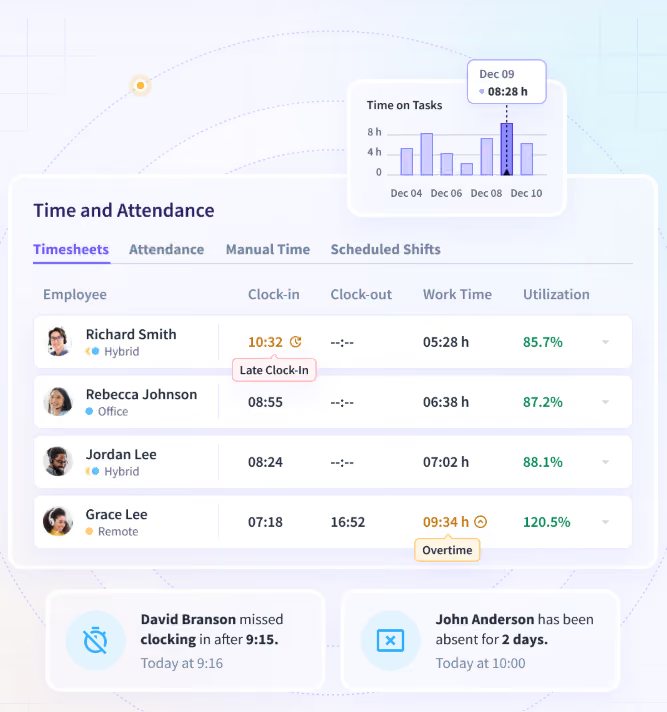
Insightful seamlessly integrates with a company’s existing HRIS platform, adding a powerful work data layer that gives managers actionable insight into team work patterns. Insightful’s Time & Attendance features includes PTO calendaring and time off, alongside time tracking, attendance reporting, and workforce analytics. Rather than treating leave as a standalone record, Insightful ties PTO data to the same dashboards used for utilization and capacity planning, so a leave spike and a workload imbalance show up in one view instead of two.
Best for: Organizations that want PTO calendaring in the same system as time tracking, attendance, and workforce analytics. Insightful integrates with existing HRIS systems; employees request time off through the HRIS, and that time shows up automatically in Insightful. Insightful flags overlapping time off or coverage drops due to PTO. Not a fit for teams that specifically want a PTO-only app with no time tracking or monitoring component.
Key features: PTO calendaring that alerts managers to drops in coverage, payroll data export with native payroll integrations, shift scheduling, automatic timesheets, and workforce analytics that connect time and attendance to broader productivity reporting.
Pricing: Time and attendance features, including PTO calendaring, are included in the Workforce Analytics plan, at $8/seat/month (annual). See the Insightful pricing page for more.
➕ Pros
PTO sits inside the same platform used for time tracking, attendance, and utilization reporting, so leave data feeds directly into workforce planning instead of living in a separate app. Backed by SOC 2, ISO 27001, HIPAA, GDPR, and CCPA compliance.
2. Connecteam
Connecteam manages PTO through paid and unpaid leave policies that can be tracked in hours or days and run on calendar-year, custom, or anniversary cycles, configured separately for full-time, hourly, or department groups. Approved leave appears directly on the job scheduler, so managers see coverage gaps before they happen rather than after.
Best for: Small and mobile-first teams that want PTO built into scheduling and a time clock rather than a separate app.
Key features: Flexible accrual rules including fixed and per-hour accruals, carryover limits and expiration windows, tenure-based policies, and time off synced to scheduling and the mobile time clock.
Pricing: Free for up to 10 users on the Small Business Plan. Paid plans start around $29 per hub (Operations, Communications, or HR & Skills) for up to 30 users, billed annually.
➕ Pros
Genuinely free for very small teams, with the free plan covering full PTO policy setup and mobile access rather than a stripped-down trial.
➖ Cons
Pricing is modular across three separate hubs, so a team that needs Operations, Communications, AND HR & Skills support should consider whether all the features they need would require multiple hubs.
3. BambooHR
BambooHR treats PTO as one module inside a broader HR information system. Employees request time off through a self-service portal, managers approve from a centralized dashboard, and a Who's Out calendar gives teams visibility into upcoming absences alongside employee records, onboarding, and benefits data.
Best for: HR teams that want PTO tracking as part of a complete HR system rather than a standalone tool.
Key features: Unlimited custom time-off policies, a shared Who's Out calendar, time-off reporting tied to headcount and benefits data, and mobile access for requests and approvals.
Pricing: BambooHR’s Core plan is $10/employee/month, with the Pro plan at $17 and the Elite at $25. BambooHR uses a flat $250/month rate for companies with 25 employees or fewer.
➕ Pros
PTO data lives alongside the rest of the employee record, so time-off patterns can be reviewed next to tenure, department, and benefits data without exporting to another tool.
➖ Cons
For small teams with fewer than 25 employees, the flat $250 minimum may be a concern.
4. Vacation Tracker
Vacation Tracker can be used from inside Slack, Microsoft Teams, or Google Workspace rather than as a separate destination. Employees request leave and see balances directly in chat.
Best for: Teams that want PTO tracking without leaving their existing chat tools, and that don't yet need multiple leave types or approval chains.
Key features: Native Slack, Teams, and Google Workspace integration, multi-level approval policies supported at Complete tier, and wallchart and calendar views of team availability.
Pricing: Core plan is $2/user/month with a $50/month minimum, which includes up to 3 locations and 10 departments. The Complete plan is $4/user/month with a $100/month minimum, adding features like accruals and multi-level approvals.
➕ Pros
Works inside the chat tools teams already use daily.
➖ Cons
Not designed as an advanced workforce analytics or team productivity analysis platform.
5. Buddy Punch
Buddy Punch pairs PTO tracking with time clock and anti-fraud features like Face ID integration and geofencing. It calculates PTO balances and accruals automatically, and approved time off is reflected on both timesheets and upcoming schedules.
Best for: Small businesses with hourly workers that want PTO tracking plus a simple, fraud-resistant punch clock.
Key features: Fixed and hourly PTO accruals, blackout dates to block requests during peak periods, GPS and facial recognition on punches, and payroll export to QuickBooks, ADP, Paychex, and Gusto.
Pricing: No free plan. Starter tier is $4.99/user/month + $19/month base fee, billed annually. Higher tiers add scheduling, geofencing, and enterprise support at $6.99 to $12.99/user/month.
➕ Pros
Strong accountability features come standard even on the entry tier, so teams get PTO tracking and time-theft prevention in the same low-cost plan.
➖ Cons
The $19 monthly base fee applies regardless of team size, which can make the effective per-user cost steep for teams under five.
6. Factorial
Factorial bundles PTO into its core HR platform alongside time tracking, payroll documents, and performance management. Leave requests cross-reference shift schedules automatically, and approved PTO syncs with both timesheets and payroll reports without manual entry.
Best for: Growing teams that want PTO, time tracking, and payroll data unified in one HR system.
Key features: Unlimited customizable leave policies with automated accrual, a visual team calendar, automatic real-time balance and carryover calculation, and an employee self-service portal for balances and requests.
Pricing: Starts at $8/user/month for the Core plan, which includes PTO and time tracking.
➕ Pros
PTO connects directly to shift scheduling and payroll reporting inside the same platform, reducing manual reconciliation between systems.
➖ Cons
Factorial doesn’t position itself as an employee monitoring or workforce analytics platform, making it a less ideal fit for teams needing advanced productivity analytics.
Standalone PTO Tracker vs. All-in-One Workforce Platform: How to Choose
When a Dedicated PTO Tool Makes Sense
Small teams with simple leave policies and no current need for time tracking or workforce analytics may be well served by a dedicated tool like Vacation Tracker.
When an All-in-One Platform Makes Sense
Organizations that already track time, run attendance reports, or plan capacity will likely benefit from having PTO in the same reporting layer as that data. A leave spike that coincides with a utilization dip, for example, is only visible if both data sets live in one system. This is where a platform like Insightful, which integrates with your existing tech stack and pairs PTO and leave management with time tracking and advanced workforce analytics, has an advantage over a point solution.
PTO Tracking Software and Compliance: What Ops and HR Leaders Should Check
For distributed or regulated teams, compliance credentials matter as much as feature lists. Ask each vendor about security certifications such as SOC 2 and ISO 27001, role-based access controls that limit who can view leave records, audit trails for changes to balances and approvals, and data residency options for multi-country teams.
Insightful, for example, adheres to major international standards like SOC 2, ISO 27001, HIPAA, GDPR, and CCPA, with data encrypted both in transit and at rest, (further details on the security page). Most dedicated PTO-only tools can’t offer that level of compliance, which matters more as headcount and geographic spread grow.
Common Mistakes When Choosing PTO Tracking Software
- Picking a tool that does not sync with existing time tracking or payroll systems, creating duplicate data entry.
- Ignoring compliance and audit-trail requirements until a dispute or audit forces the issue.
- Choosing based on price alone without checking whether the free or entry tier actually supports your team’s needs.
One pattern shows up more than any other: teams that outgrow spreadsheets for time tracking but keep patching PTO together with manual timesheet templates and a shared calendar. The moment leave data needs to connect to payroll, staffing, or compliance reporting, manual tracking becomes the bottleneck again.
Conclusion
The right employee time off tracker software depends less on feature checklists and more on one decision: whether leave should live in its own app or alongside time tracking, attendance, and workforce output. Teams with simple policies and no existing time tracking can start with a dedicated tool. Teams that already run time and attendance data benefit from keeping PTO in that same system, where a leave spike and a capacity dip show up together instead of in two separate dashboards.
See how Insightful brings PTO tracking together with time and attendance and advanced workforce analytics. Start Your Free Trial.
FAQs
What is PTO tracker software?
PTO tracker software automates employee time-off requests, approvals, balance tracking, and calendar visibility in place of spreadsheets or email threads. Some, like Insightful, bundle PTO calendaring with broader time and attendance data rather than treating leave as a standalone record.
Is there free employee time off tracking software?
Yes. Connecteam offers a genuinely free tier, not just a trial. However, Connecteam's free plan only allows for up to 10 users, requiring upgrading once a team scales beyond that limit.
Can PTO tracking software integrate with payroll?
Most platforms sync approved leave hours with payroll providers or support data export for manual upload, and depth varies by vendor. BambooHR and Factorial both sync leave data with in-platform payroll modules, while Insightful offers payroll integrations with platforms like ADP Workforce Now, PayFit, and more. Confirm sync depth with your specific payroll provider before assuming full automation.
How much does employee time off tracker software cost?
Standalone PTO tools typically range from $2 to $10 per user per month for base tiers. PTO features bundled inside broader HR or workforce platforms, like BambooHR or Factorial, vary by plan and generally land between $8 and $22 per employee per month.


.webp)



