.svg)


One Agent, Any Way You Need to Run It
Insightful deploys as a lightweight desktop agent with full-depth capabilities. IT sets whether employees see the agent, what it collects, and how it reaches each machine. On-premise and cloud deployment is available, across Windows, macOS, or Linux (beta). Customizable access and bulk deployment make it easy. Deploy Insightful how your org sees fit, with full support at every step.


.avif)










Different teams, different deployment solutions
Choose based on the level of control and visibility you need. A regulated claims team and a contractor pool using their own laptops call for different setups. Insightful gives IT the flexibility to run deployment to fit their unique environment.


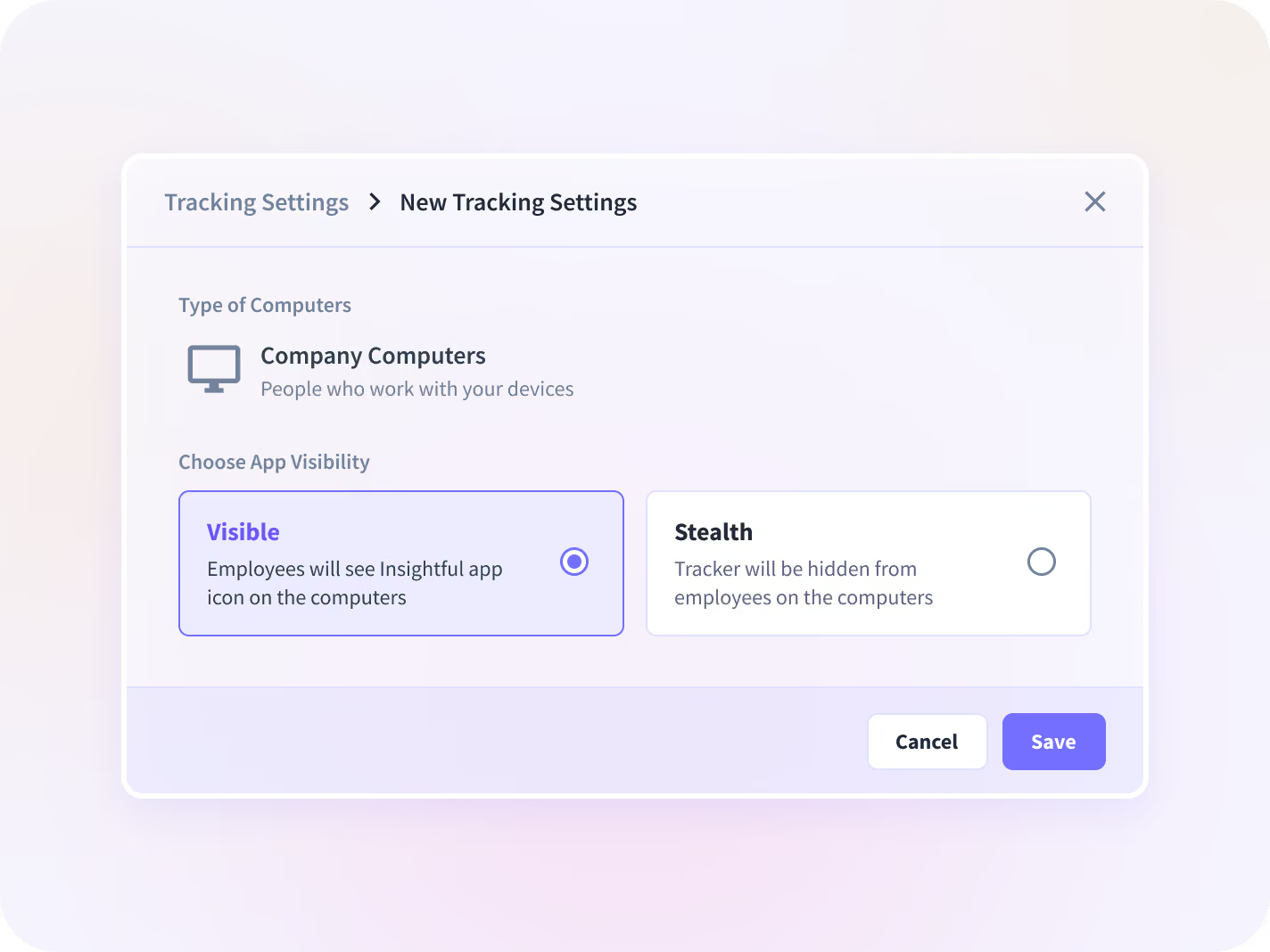
Stealth and Visible are settings on the same Company install. No second application to package or keep patched. Nothing stops you from installing the personal version on a company machine or vice versa. The choice is about how you want the agent to behave.


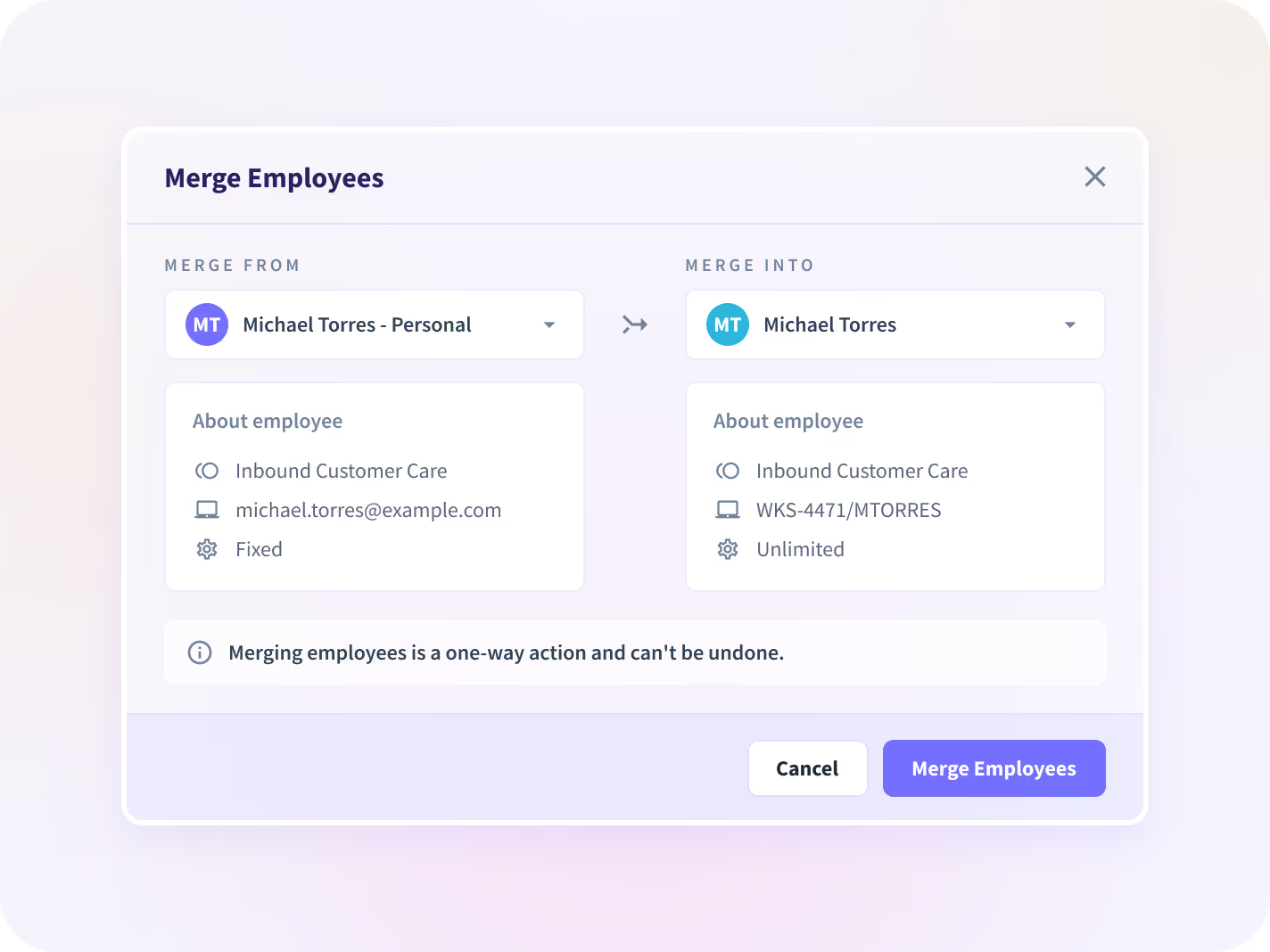
Someone working across two company computers is a single license. Merge profiles at will, along with shifts, projects, and productivity data.


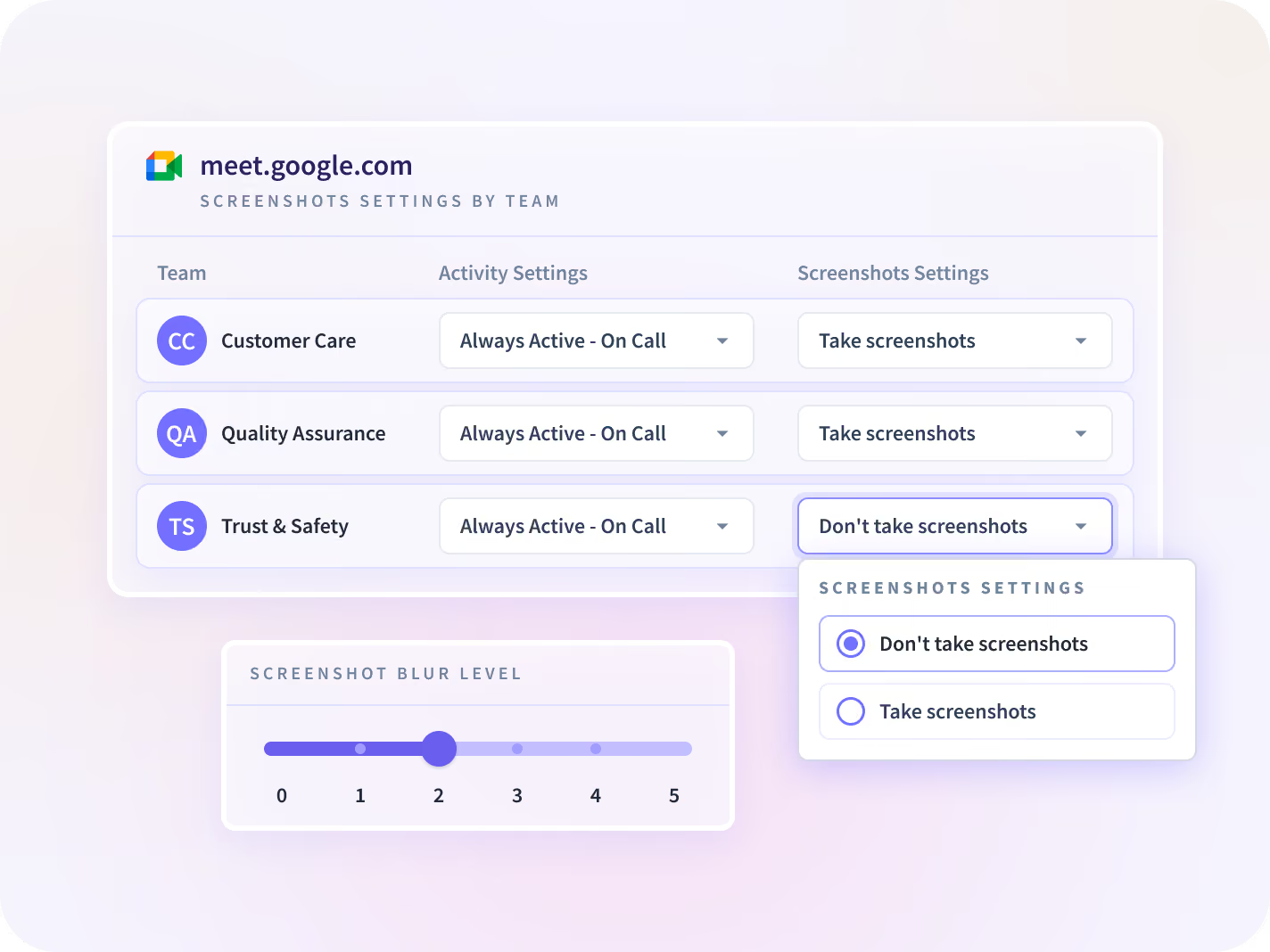
Switch off data collection, time data, or screenshots for any app, team, or individual. Adjust screenshot blurring intensity. A finance team can run with screenshots disabled while another team runs with them on.


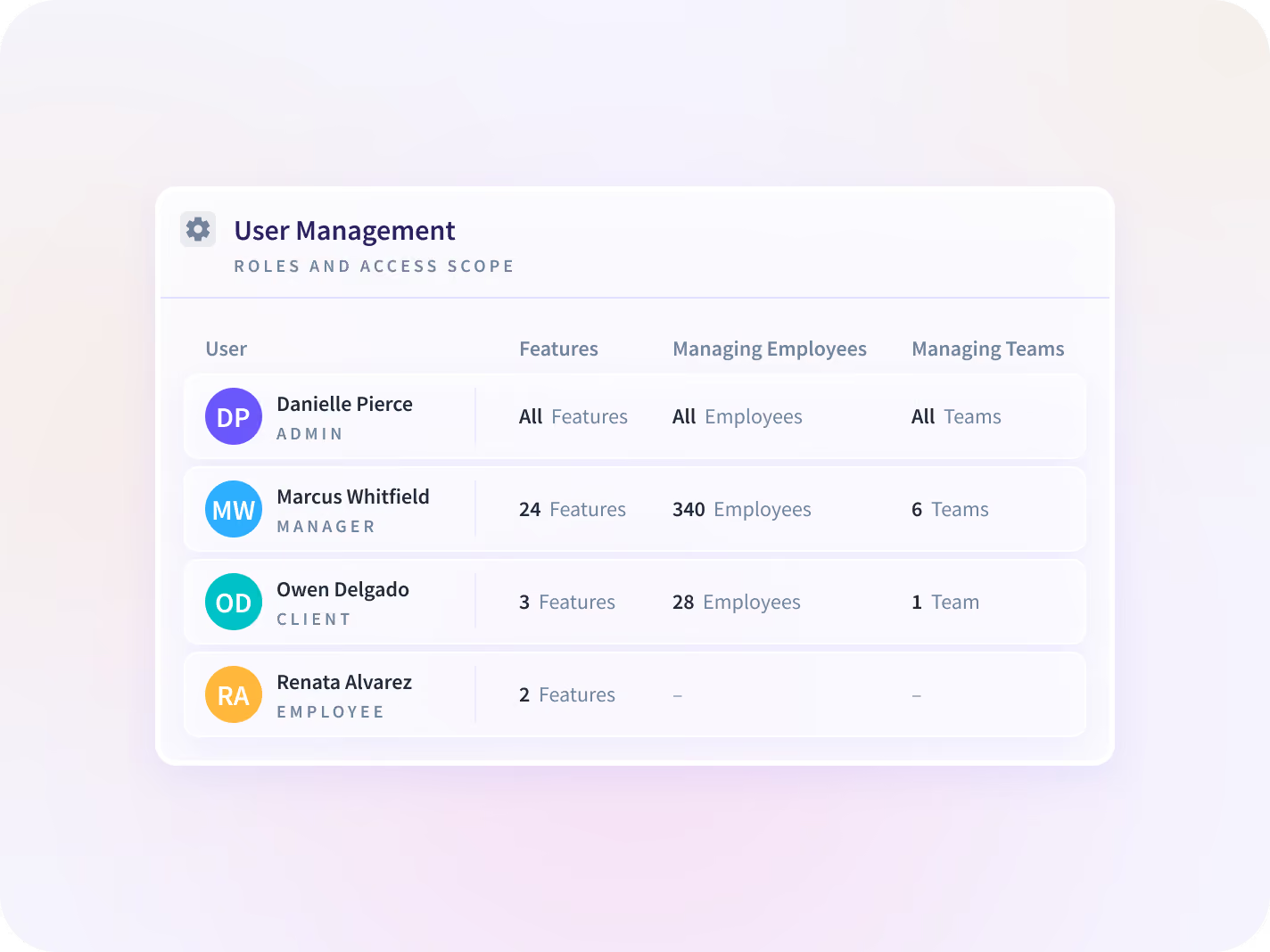
The Company agent installs with admin privileges and runs as a service that handles auto-start, updates, and recovery. Four roles define who sees what: Admin, Manager, Client, Employee. Full spectrum control, from total access down to single project or person.

How Insightful deployment works
Two setup types: Personal or Company. Two visibility modes: Visible or Stealth. Setup type governs how people are identified and when collection starts. Visibility mode governs what appears on the screen. Personal is built for privacy and employee control: agent is always visible, manual clock in/out, data collected only during clock-in. Company is built for fuller oversight: Run visibly or in stealth, with automatic distribution, registration, and collection.

Choose
Personal or Company setup

Set
Transparency and scope

Push
Silently and in-bulk

Tune
What the agent captures

Full flexibility, no friction
A lightweight application installed on employee computers, running in the background. Choose where data is housed, the type of install, the permission level, the transparency desired, what data is collected, and how. Insightful updates automatically and never touches your systems.

Personal
Installs in user space and needs no admin privileges. The agent stays visible, the employee clocks in and out, and nothing is collected while they are clocked out. People are added by email invitation and identified by email address. Manual or Project Based time only. Runs like a normal app.

Company setup, Visible mode
The installer is distributed to machines and registers each person automatically on first login, identified by local user account and device ID. The employee sees a widget, clocks in and out, and can log manual time for work done away from the computer. Automatic observation (Unlimited, Fixed, Network-Based). Runs as a background service.

Company setup, Stealth mode
Automatic registration and automatic clock-in, with no widget on screen for zero disruption to how people work day to day. The process stays listed in Task Manager on Windows and Activity Monitor on macOS under the name Workpuls.
.svg)
Four roles
Admins have full access and can’t be limited. Managers see assigned employee, teams, tasks, projects, and granted features. Clients see their project, for external sharing. Employees, the measured person, can see their own data if the Admin enables it.

Virtual and remote desktop
Citrix, VDI, and remote desktop environments are supported. Alongside the Full and Light builds there are serviceless Citrix and Per-User variants. Environment-specific setup is handled with Support.

On-premise, cloud, or private cloud
Run on Insightful's cloud, in a private cloud, or inside your own infrastructure. Data is hosted on Google Cloud for the United States, European Union, and Saudi Arabia regions. On-premise deployments receive new versions as update packages, with full support from day one.
Match configuration to the policy
What you choose depends on what you’re protecting, what your policy requires, and what your company culture demands.

- Company setup with Stealth mode, for a defensible record of work
- Security alerts on a named app, site, or keyword, capturing a screenshot on trigger even where screenshots are otherwise off
- Activity Logs for investigation, retained up to three months

- Personal setup, so collection runs only between clock-in and clock-out
- No admin privileges required on the machine
- Identity comes from the email address, so nothing depends on the hardware

- Company setup with automatic clock-in, which removes timezone problems
- Silent install pushed through your existing endpoint management at any fleet size
- Shared machines register each local login as a separate person

- Company setup with Visible mode and the employee widget
- Employees see the same real-time data their managers see, once an Admin enables it
- Manual time entry, so hours spent off the keyboard still land on the timesheet

Full-Security Breadth
Insightful data is AICPA SOC 2, ISO 27001, GDPR, CSA, CCPA, and HIPAA compliant to protect against damaging data breaches. Data is fully encrypted at rest with AES-256 and in transit via HTTPS, SSL, TLS 1.3 to deliver the most secure computer monitoring software.

Remote & Mass Deployment
Insightful installs in bulk through Active Directory, an RMM tool, or an MDM, with silent installation on both Windows and macOS. SSO and directory integration keep identity where it already lives, and HRIS integrations keep the employee list current as people join and leave.

Device Support
Windows (10 or later, requires .NET Framework 4.8+) and macOS 11 or later. Linux is supported in Beta, and requires Gnome/Cinnamon on Xorg. On macOS, Support prepares a configuration profile for your environment and applies it before install, which removes the per-user permission prompts. Not compatible with Chromebooks, iPads, or mobile devices.
Fits the tools you already own
Insightful connects seamlessly to 50+ popular tools across project management, HelpDesk, Employee Directory, and more. Full HRIS sync as employee roles change. Insightful’s MCP server extends that reach to the AI clients your teams already work in.


Trusted by IT teams who set their own level of control






Define your rollout, develop your business
FAQs
Two setup types and two visibility modes. Company registers people automatically and supports automatic time capture. Personal uses an email invitation and runs only while the person is clocked in. On Company installs, Visible shows a widget and Stealth runs without one.
Stealth describes how the agent behaves once it is on the machine, and how visible it is to the employee. Silent install describes how it gets there. The two are configured separately, and you can combine them however your policy requires.
It can. The agent runs as Workpuls, and security software sometimes flags it, which usually shows up as a machine reporting no data at all. Ask Support for the current allow-list and antivirus exclusion before a wide rollout. Deploying to a test group first will surface it early.
No. Both are ways of installing, and each one works on company hardware or on an employee's own machine. Pick by how much visibility you need, and keep the hardware question separate.
Windows 10 and later, which needs .NET Framework 4.8 or higher, and macOS. Linux is in Beta and requires Gnome or Cinnamon under Xorg, so Wayland is out. Chromebooks, iPads, and phones fall outside what the agent covers.
On the Company setup each local login on a shared machine registers as its own person, so a hot-desked workstation resolves correctly. Someone using two computers creates two profiles, which are then merged from the Merge tab into one billed record. In Active Directory environments this happens on its own: one person across several domain-joined machines lands in a single account, with no merge and no double billing.
Deactivating a person stops collection and billing from that point. There is a seven-day lock before they can be reactivated, though same-day reactivation works until midnight. Deleting a profile and its data outright goes through Support and cannot be undone.
Yes. Alongside the standard Full and Light builds, there are serviceless Citrix and Per-User variants for virtual and remote desktop setups. Support handles the environment-specific configuration with you.
Accessibility permission always, and screen recording permission where screenshots are on. Support prepares and applies a configuration profile before install, which covers the first. Apple requires the second to be granted manually, so if screenshots come back black on a Mac, that permission is almost always the reason. macOS permissions and settings
There are four roles. Admins see everything. Managers see only the people, teams, or projects in their scope and only the features an Admin grants. Clients see a single project. Employees see their own data where an Admin allows it. Admin and Manager accounts are dashboard-only, so they are neither collected from nor billed unless they also hold an Employee account.
It logs no keys typed, captures no bulk messages, records no audio, and takes no webcam access. It observes and will not block or control the computer. Insightful also has no reach into the business data held on the machines it runs on.
Capture can be switched off entirely for a named application, a whole team, or a single individual, and specific apps can be excluded at team level. Screenshots can also be blurred where the work itself is sensitive. Productivity labels follow the same pattern, set once for the organization and overridden per team where a role needs different definitions.
Yes, on-premise or in a private cloud, for organizations whose security or regulatory position rules out cloud storage. These deployments receive new versions as update packages applied on your own schedule, so they typically sit behind the cloud release, and a few cloud-delivered capabilities are unavailable. Support and Engineering are part of these projects from the start.
Screenshots and screen recordings up to two months, activity logs up to three months, everything else up to two years. The agent buffers briefly on the machine and syncs upward, so the history sits on the platform and not on the employee's computer.
Insightful is AICPA SOC 2, ISO 27001, GDPR, CSA, CCPA, and HIPAA compliant, with data encrypted at rest and in transit.


