.svg)
10 Best Hybrid Work Software Tools in 2026
.avif)




Talk to Sales
Our dedicated team is here to
answer all your custom needs.

Key Takeaways:
- In hybrid teams, structured workflows can give way to informal coordination, productivity data fragments across tools, and leadership loses sight of how work happens.
- Most hybrid stacks cover communication, project management, HR, and knowledge sharing. But the workforce analytics layer showing how work actually flows across teams is often missing.
- Communication volume and task counts are not proxies for output. Connection tools cannot answer whether the work that matters is actually getting done.
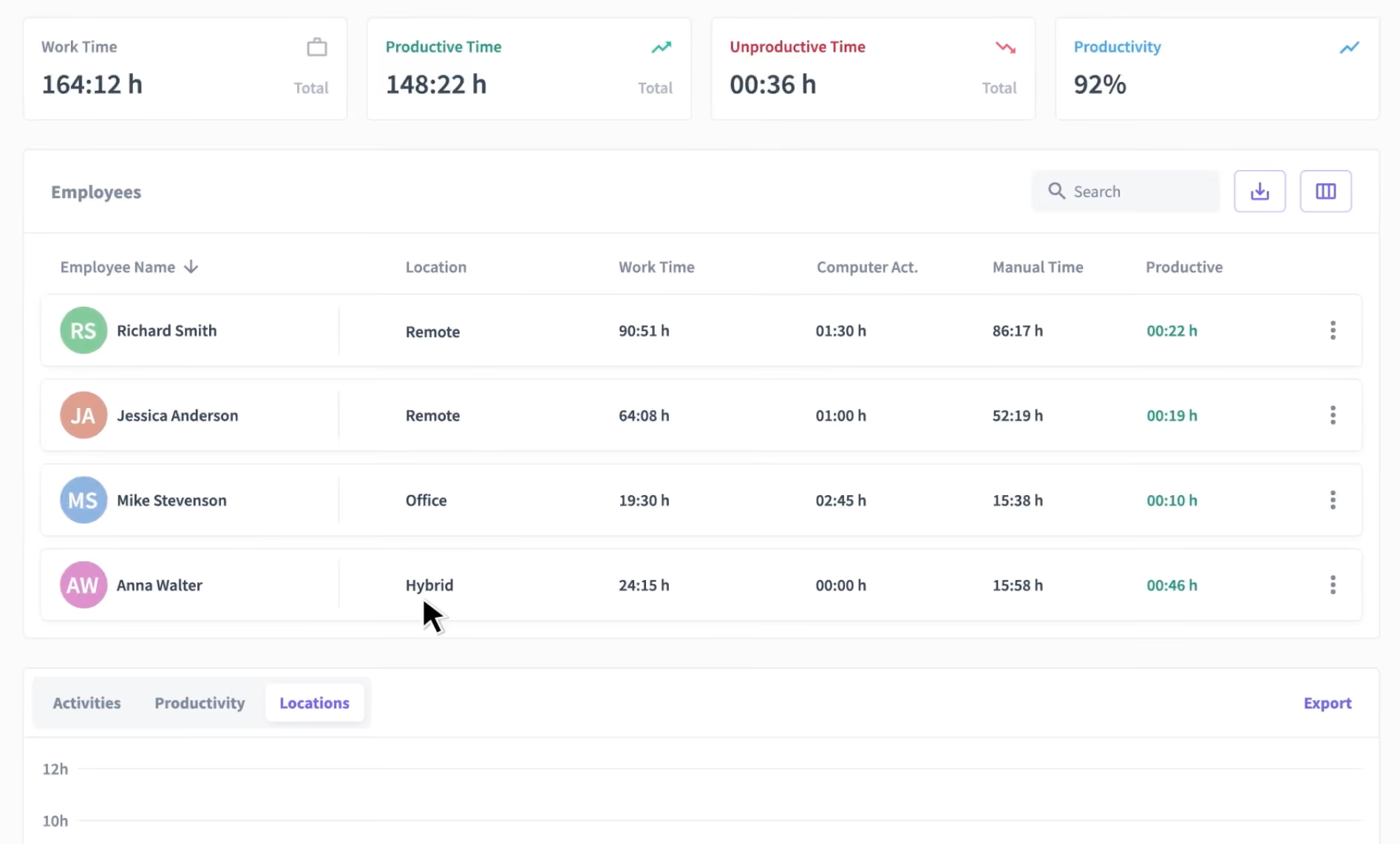
- Insightful's Location Insights surfaces productivity differences between remote and in-office staff, grounding hybrid policy decisions in real behavior rather than assumptions.
Insightful's analysis found that 97% of enterprise work occurs through non-defined, unmanaged processes. In hybrid environments, that gap widens. When teams split time between home and office, informal coordination replaces structured workflows, productivity data fragments across tools, and leadership loses sight of how work actually happens day to day.
The right hybrid work software for 2026 does more than keep distributed teams connected. It answers a harder question: Is the work that matters actually getting done, and who’s doing it? This guide covers 10 platforms evaluated on what they actually deliver for hybrid teams.
10 Best Hybrid Work Software Platforms
1. Insightful
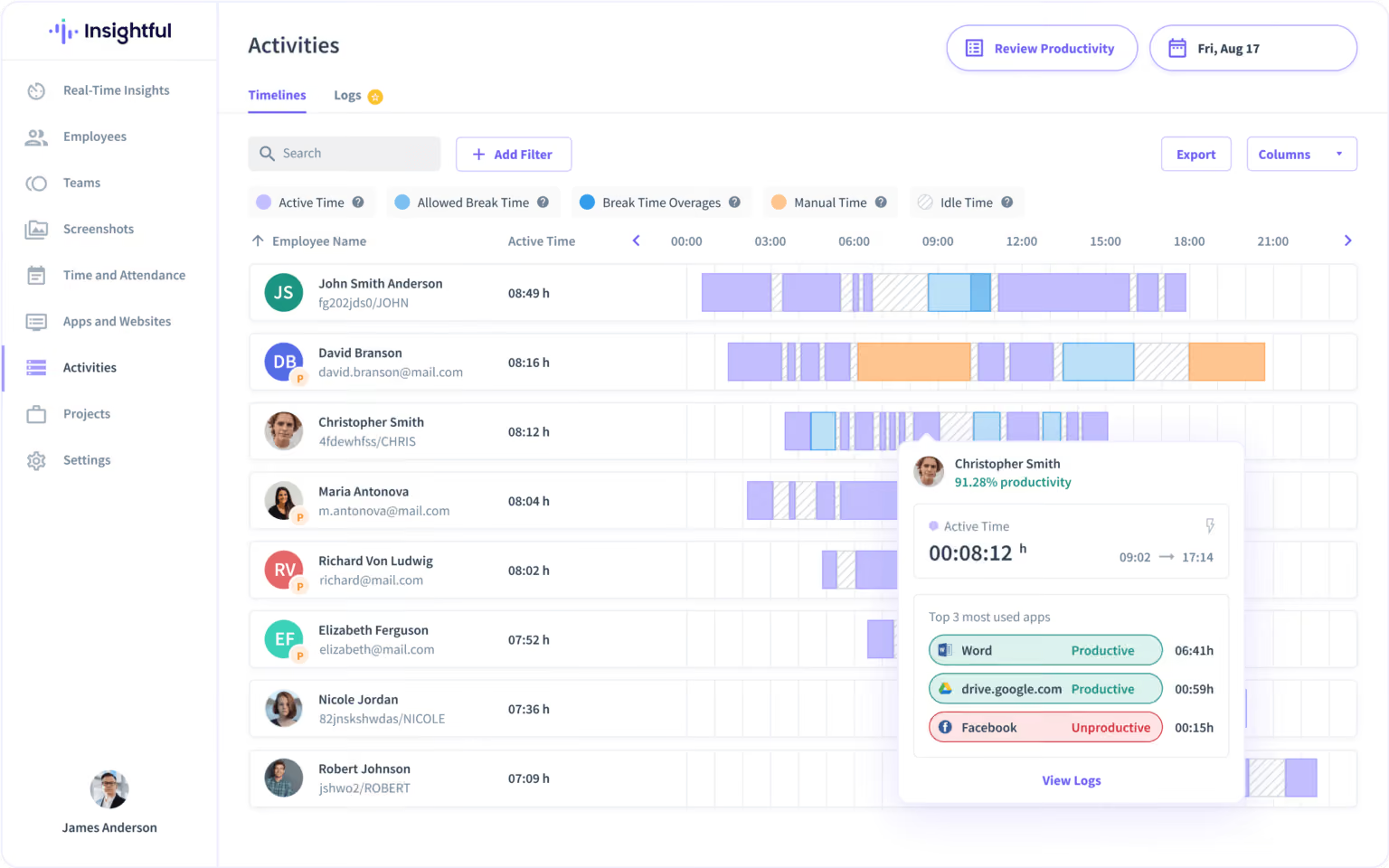
Insightful is a work intelligence platform built for the realities of hybrid work, combining workforce analytics, workflow optimization, and workspace security into a unified view of how teams actually operate. It gives operations and HR leaders on-demand visibility into where time goes, where productivity stalls, and how work patterns differ across locations and roles without relying on manual check-ins or self-reported data.
Its Location Insights report surfaces meaningful productivity differences between remote and in-office employees, grounding hybrid policy decisions in real behavior rather than assumptions. Org Groups benchmarks performance across departments automatically, helping leaders spot gaps and course-correct before they become systemic. The result: distributed work complexity turned into clear, actionable intelligence.
At Peach Payments, Insightful supported the company's transition to remote and hybrid work, delivering 40% business growth and a 22% increase in remote team productivity. Teams drove the output of eight people with just two new hires.
✅ Best for: Operations, finance, and HR leaders who need hybrid team visibility tied to business outcomes.
➕ Pros: Full workforce analytics across remote, hybrid, and in-office teams, with automatic time mapping, location insights, compliance certifications, and org group benchmarking.
2. Microsoft Teams
Microsoft Teams is the default communication hub for organizations on Microsoft 365. It covers messaging, video, file sharing, and calendar integrations, with built-in Copilot-powered meeting summaries and task tracking. For hybrid teams, it provides a consistent communication layer regardless of location.
✅ Best for: Enterprises on Microsoft 365 needing a unified communication and collaboration platform.
➕ Pros: Lowest-friction hub for Microsoft 365 organizations, with Copilot reducing meeting overhead.
➖ Cons: Not designed for visibility into how time is actually spent; productivity data can stay siloed within the ecosystem.
3. Slack
Slack structures team communication through channels, making async work across locations easier to manage. Its Workflow Builder automates routine notifications and task handoffs, and it integrates with Asana, Jira, Google Workspace, and Salesforce. For hybrid teams, Slack serves as the backbone of communication.
✅ Best for: Teams needing async-first messaging with strong integrations into project and productivity tools.
➕ Pros: Channel structure and Workflow Builder make it the strongest async layer for distributed and flexible-schedule teams.
➖ Cons: Communication volume is not a proxy for output; built as a communications tool rather than providing cross-tool workforce analytics data.
4. Zoom
Zoom is the standard for video meetings, webinars, and hybrid events. Zoom Rooms supports in-office spaces with consistent hybrid audio-visual setups, and AI meeting summaries reduce post-call documentation overhead. Like Teams and Slack, Zoom solves the communication layer.
✅ Best for: Teams that run frequent video meetings, webinars, or hybrid events and need consistent room setups.
➕ Pros: Zoom Rooms deliver a consistent meeting experience regardless of location, with AI summaries cutting post-call overhead.
➖ Cons: Solves the meeting problem, not the productivity measurement one; no data on time spent outside scheduled calls.
5. Asana
Asana handles project and task management across distributed teams. Its Timeline and Workload views give managers a picture of task load per person. It integrates with Teams, Slack, and Google Workspace.
✅ Best for: Project teams needing structured task management with workload tracking at the project level.
➕ Pros: Timeline and Workload views help managers identify overload.
➖ Cons: Workload data is project-scoped and can rely on manual task updates.
6. Monday.com
Monday.com provides flexible, visual project and workflow management. Teams can build dashboards that surface project status, workload, and dependencies in one view, useful when managers lack real-time floor visibility. No-code automation reduces manual update overhead.
✅ Best for: Operations teams managing multiple concurrent projects with varied workflows.
➕ Pros: Flexible dashboards surface status and workload across multiple workstreams without manual consolidation.
➖ Cons: Task layer only; users may need more depth of workforce-wide productivity analytics, utilization data, or location-based reporting.
7. Notion
Notion functions as a team knowledge base, documentation hub, and lightweight project management tool. For hybrid teams, it addresses information fragmentation: processes, SOPs, and project notes that would otherwise scatter across email threads and local drives.
✅ Best for: Teams centralizing documentation, processes, and knowledge management in a shared workspace.
➕ Pros: Compiles documentation in one searchable workspace, reducing information scatter across hybrid teams.
➖ Cons: Requires governance to stay organized; not a workforce analytics tool.
8. BambooHR
BambooHR covers core HR functions for growing organizations: employee records, onboarding, PTO tracking, performance reviews, and org-level reporting. For hybrid teams, it centralizes people data that would otherwise live across spreadsheets and email chains.
✅ Best for: HR and people teams needing structured records management and reporting as headcount scales.
➕ Pros: Clean onboarding workflows, PTO management, and people reporting that scale with headcount.
➖ Cons: HR-scoped analytics only; users may need operational productivity, capacity planning, or team utilization data.

Noticed a pattern? Most of the tools on this list are built for communication, project delivery, or HR. They do those jobs well. Insightful is a different category entirely: a work intelligence platform that connects across 50+ integrations to show leaders how time is actually spent, where productivity stalls, and how hybrid work patterns translate into business outcomes. If that is the layer your stack is missing, start your 7-day free trial with no credit card required.
9. Loom
Loom replaces synchronous meetings with async video messages. For hybrid teams across time zones or flexible schedules, it reduces coordination costs and lets recipients consume updates on their own schedule. It integrates with Slack, Notion, and Google Workspace.
✅ Best for: Teams with significant async communication needs or cross-time-zone collaboration overhead.
➕ Pros: Cuts coordination overhead by replacing real-time meetings with async video for distributed teams. Allows for hands-on demonstrations via screen video capture.
➖ Cons: Async communication only; no productivity tracking, workload data, or workforce analytics.
10. Robin
Robin handles office scheduling and space management for hybrid teams, coordinating in-office attendance. It covers desk booking, meeting room reservations, and office capacity planning, giving operations teams data on which days drive peak attendance.
✅ Best for: Facilities and operations teams managing both physical office space and hybrid attendance coordination.
➕ Pros: Makes desk booking and space planning manageable as hybrid teams grow.
➖ Cons: Meant for physical logistics; visibility into workforce productivity or team performance can be limited.
The Layer Most Hybrid Stacks Are
Virtually all hybrid teams already have communications and project management tools in place. What they struggle with is visibility and ensuring their various software and people resources are producing real bottom-line impact.
Communication tools, project boards, and HR systems each capture a piece of work, but none show how it actually flows across locations. You can have Teams, Asana, and BambooHR fully in place and still have no clear answer to whether remote employees are as productive as in-office ones, where workload concentrates, or which teams are running below capacity. That’s a work intelligence gap. Insightful closes it.
When work is spread across people, locations, and tools, small gaps add up fast. Time goes missing. Work slows down. Problems surface late. Insightful shows where time is going, how teams are performing, and where work is breaking down. Without relying on manual tracking or guesswork.
Get full Workforce Analytics access across your hybrid, remote, or in-office team with Insightful's 7-day free trial.
FAQs
What is hybrid work software?
Hybrid work software covers the tools that support teams working across remote and in-office locations. The category spans communication, project management, HR, knowledge management, and workforce analytics. Most organizations need a combination rather than a single platform, and the analytics layer is most commonly the missing piece.
What is the best software for hybrid teams?
Effective hybrid teams generally need tools across five areas: a communication hub, project management, a knowledge base, an HR system, and a workforce analytics layer. Most have the first four in place. The analytics layer is the consistently missing piece; the only one that shows how work actually flows across locations.
How is workforce analytics software different from other hybrid work tools?
Most hybrid work tools, including communication platforms, project boards, and HR systems, show what was discussed and what tasks exist. Workforce analytics shows how time is actually spent across tools, teams, and locations, and connects that data to bottom-line outcomes. Insightful surfaces productivity differences between remote and in-office employees and provides location-level benchmarks that no other tool on this list generates.

.webp)
.webp)
